Showing posts with label camera. Show all posts

Monday, November 24, 2025

China’s new AI-based video capsule


Tuesday, September 13, 2022

iniVation - DAVIS 346 Neuromorphic Event camera.

A high-precision camera sensor manufactured by Swiss company iniVation, which develops neuromorphic vision systems.

Employs a patented technology that works like the human retina, significantly reducing power consumption, data rate and computational requirements compared to conventional camera sensors, while providing a dynamic range of 120dB and latency of 1ms. Has less and higher performance.

It is expected to be used in the following fields:

surveillance and ambient sensing / high-speed robots / FA applications (factory automation) / microscopy / motion analysis (humans and animals) / fluid dynamics / sleep research, chronobiology / Fluorescence Imaging / Particle Tracking


Product Specifications:

  • 346 x 260 resolution

  • Simultaneous frame and event output

  • H 40 x W 60 x D 25 mm

  • 100 g without lens

  • CE certified

  • Color or mono

Device comes with:

  • Micro-USB 3.0 cable

  • CS-mount lens

  • 1/4" mount


The camera does not output frames of intensity images. However, similar intensity images can be reconstructed from the event output by their DV software. 


There is support for multi-camera time synchronization via daisy chain connection and external event injection.


iniVation website: https://inivation.com/


CED: Color Event Camera Dataset
CED is the first Color Event Camera Dataset, featuring 50 minutes of footage with both color frames and color events from the Color-DAVIS346. Event cameras have several advantages over conventional cameras: high dynamic range, low latency and immunity to motion blur. We include sequences that showcase these attractive properties, such as high-speed, low-light etc. All the data are released as binary (rosbag) files.


Thursday, September 30, 2021

USING A LASER TO BLAST AWAY A BAYER ARRAY


A Bayer array, or Bayer filter, is what lets a digital camera take color photos. It’s an array of tiny color filters that sit on top of a camera’s CCD. The filter makes it so that each sub-pixel in the image sensor only sees red, green, or blue light. The Bayer filter is an elegant tool that gives us color digital photos, but what would you do if you wanted to remove one?

[Les Wright] has devised a way to remove the Bayer filter from the Raspberry Pi Camera. Along with filtering red, green, and blue light for their respective sensors, Bayer filters also greatly reduce the amount of UV and IR light that make it to the CCD sensor. [Les] uses the Raspberry Pi camera in his Pi-based Spectrometer, and he wants to remove the Bayer filter to improve and expand its sensitivity.

Of course, [Les] isn’t the first one to want to do this. Some have succeeded in physically scratching the filter off of the CCD, but because the Pi Camera has vital circuitry around the outside of the sensor, scratching the filter off would likely destroy the circuitry. Others have stripped it off using chemical means, so [Les] gave this a go and destroyed no small number of cameras in his attempt to strip the filter off with solvents like DMSO, brake fluid, and industrial paint stripper.
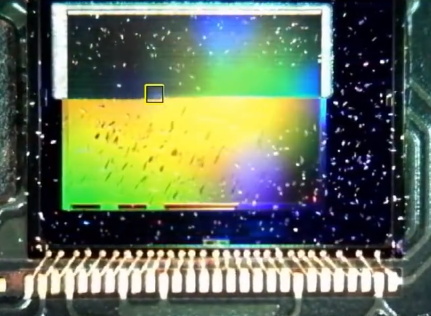
A look at the CCD, halfway through the process.

Inspired by techniques used in industry, [Les] eventually tried to use a several-kW nitrogen laser to burn off the filter (which seems appropriate given his experience with lasers). He built a rig that raster scans the laser across the sensor using stepper motors to drive micrometer bases. A USB microscope was included to allow progress to be monitored, and you can see a change in the sensor’s appearance as the filter is removed.

After blasting off the Bayer filter, [Les] plugged his improved camera into his home-built spectrometer and pointed it outside. The new camera gives the spectrometer much more uniform sensitivity and allows [Les] to see further into the IR and UV bands. The spectrometer can even detect the Fraunhofer lines—subtle dips in the sun’s spectrum from absorption by molecules in the atmosphere.

This is incredible for a DIY setup and instrument, and we can’t wait to see what [Les] does next to improve his measurements. If your spectrometry needs are more mass than visual, take a look at this home-built mass spectrometer. Home spectrometers aren’t just for examining light spectra—they can also be used to judge the ripeness of fruit!


 https://hackaday.com/2021/08/09/using-a-laser-to-blast-away-a-bayer-array/

Sunday, January 17, 2021

Ambarella's new chip - Dual 8K video, 4K at 240fps

Small devices like action cams will be able to capture video at up to 8K at 30fps or 4K at 240fps. The CV5 will also support HDR processing to balance out extreme lighting conditions as well as do image stabilization, all on-chip."

https://www.cnet.com/news/your-next-drone-or-action-cam-will-shoot-8k-video-4k-at-240fps-with-ambarellas-new-chip/


Thursday, December 10, 2020

A camera that can look inside the keyhole to read the keys pattern!!


Currently $345 USD

The LockTech LTKS KwikSet Decoder is a WIFI enabled digital scope that when used with a compatible IOS or Android Smartphone makes decoding these locks ridiculously easy and fast!

Features:
- Decodes all current SmartKey locks (GEN 1, 2, 3, & 4) and SmartKey Control Key cylinders as well.
- A real glass mirror for the clearest image possible.
- Internal LED eliminates glare off the front of the lock.
- Position Alignment Spacers eliminate the guesswork of where you're looking at in the lock and locating individual wafers/pins during the decoding process.
- LED dimmer allows the user to increase or decrease the brightness inside of the lock.
- Live Video Display Feed, SnapShot Mode, or Video Mode.
- Rechargeable battery
- Magnetic Protective Storage Cap
- Spacers, Protective Cap, and Laminated Depth Chart are tethered for convenience.

 System requirement:

Android 4.2 and iOS 8.0 or later


https://www.internationalkeysupply.com/products/locktech-ltks-wi-fi-enabled-decoder-for-kwikset-smartkey-locks

Wednesday, August 12, 2020

Sony Exmor IMX219

  • Sony Exmor IMX219 Sensor Capable of 4K30 1080P60 720P180 8MP Still
  • 3280 (H) x 2464 (V) Active Pixel Count
  • Maximum of 1080P30 and 8MP Stills in Raspberry Pi Board
  • 2A Power Supply Highly Recommended


The specs on the camera is amazing, and it takes decent pictures. 

The fov field of view is rather limited.  Angle of View: 62.2 x 48.8 degrees

But the aperture is so small it's practically a pinhole camera which can make this useful for a number of applications. 


Sunday, April 12, 2020

Quantum camera snaps objects it cannot 'see'


A normal digital camera can take snaps of objects not directly visible to its lens, US researchers have shown. The “ghost imaging” technique could help satellites take snapshots through clouds or smoke.
Physicists have known for more than a decade that ghost imaging is possible. But, until now, experiments had only imaged the holes in stencil-like masks, which limited its potential applications.
Now Yanhua Shih of the University of Maryland, Baltimore, and colleagues at the US Army Research Laboratory, also in Maryland, have now taken the first ghost images of an opaque object – a toy soldier (see image, top right).

Quantum camera

Ghost imaging works a bit like taking a flash-lit photo of an object using a normal camera. There the image forms from photons that come out of the flash, bounce off an object and into the lens.
The new technique also uses a light source to illuminate an object. However, the image is not formed from light that hits the object and bounces back. Instead, the camera collects photons that do not hit the object, but are paired through a quantum effect with others that did.
In Shih’s experiments a toy soldier was placed 45 centimetres away from a light source, which was split into two beams. One was pointed at the toy and the other at a digital camera. A photon detector was placed near the soldier, able only to record when a photon bounced off.

Connected pairs

Photons from the light source constantly travel down both paths made by the splitter, either towards the soldier and the photon detector, or towards the camera. The detector and camera record a constant stream of those photons, and occasionally record a photon at exactly the same time.
When this happens, there is a direct relationship between where one of the photons hit the soldier, and where the other one hits the camera’s sensor, says Shih, because of a quantum effect called “two-photon interference”.
“If the first photon stops at one point on the object plane, the second photon can only be observed at the corresponding point on the image plane,” he says.
So when the camera records only pixels from photons that hit simultaneously with one reaching the detector, a “ghost image” of the object builds up. The soldier’s image appeared after around 1000 coincidental photons were recorded.

Sunny snaps

“It is clear that the experimental set-up can be directly applied to sensing applications,” Shih told New Scientist.
The same method could one day be employed to produce satellite images of objects hidden behind clouds or smoke, using the sun’s radiation as the photon source, says Shih. Doing that may require a photon counter beneath the clouds, but could allow a top-down view not possible using conventional methods.
Not everyone agrees that quantum effects are at work in ghost imaging, though. Baris Erkmen and Jeffrey Shapiro of the Massachusetts Institute of Technology, Cambridge, US, point out in a recent paper that classical physics says light sources produce numbers of uncoordinated photons that are not correlated as Shih suggests.
They suspect ghost images might be produced without a quantum link between photon pairs, purely because some photons are just similar.
Quantum World – Learn more about a weird world in our comprehensive special report.


https://www.newscientist.com/article/dn13825-quantum-camera-snaps-objects-it-cannot-see/


Friday, November 01, 2019

OmniVision announces world record for smallest image sensor


OmniVision, a developer of advanced digital imaging solutions, has announced that it has won a place in the Guinness Book of World Records with the development of its OV6948 image sensor—it now holds the record for the smallest image sensor in the world. Along with the sensor, the company also announced the development of a camera module based on the sensor called the CameraCubeChip.

https://techxplore.com/news/2019-10-omnivision-world-smallest-image-sensor.html

Saturday, August 11, 2018

Machine vision camera

http://jevois.org/


About JeVois

Open-source machine vision finally ready for prime-time in all your projects!
JeVois = video sensor + quad-core CPU + USB video + serial port, all in a tiny, self-contained package (28 cc or 1.7 cubic inches, 17 grams or 0.6 oz). Insert a microSD card loaded with the provided open-source computer vision algorithms (including OpenCV 3.4.2, TensorFlow, Caffe, Darknet, and many others), connect to your desktop, laptop, and/or Arduino, and give your projects the sense of sight immediately.


Thursday, December 22, 2016

The OpenMV project - OpenMV Cam M7

https://openmv.io/

The OpenMV Cam M7 is powered by the 216 MHz ARM Cortex M7 processor which can execute up to 2 instructions per clock

512KB of RAM enabling 640x480 grayscale images / video (up to 320x240 for RGB565 still)

MicroPython has 64KB more heap space (~100KB total) with the OpenMV Cam M7 so you can do more in MicroPython now

$65 retail ($55 to pre-order)

The OpenMV project is about creating low-cost, extensible, Python powered, machine vision modules and aims at becoming the “Arduino of Machine Vision“. Our goal is to bring machine vision algorithms closer to makers and hobbyists. We’ve done the difficult and time-consuming algorithm work for you leaving more time for your creativity!
The OpenMV Cam is like an super powerful Arduino with a camera on board that you program in Python. We make it easy to run machine visions algorithms on what the OpenMV Cam sees so you can track colors, detect faces, and more in seconds and then control I/O pins in the real-world.


Wednesday, November 23, 2016

Chronos 1.4 high-speed camera up to 21,600fps


Chronos 1.4 is a purpose-designed, professional high-speed camera in the palm of your hand. With a 1.4 gigapixel-per-second throughput, you can capture stunning high-speed video at up to 1280x1024 resolution. Frame rate ranges from 1,057fps at full resolution, up to 21,600fps at minimum resolution.

Features and specs

See the full specs in the Chronos 1.4 Datasheet
  • 1280x1024 1057fps CMOS image sensor with 1.4Gpx/s throughput
  • Higher frame rates at lower resolution (see table below)
  • Sensor dimensions 8.45 x 6.76mm, 6.6um pixel pitch
  • Global shutter - no “jello” effect during high-motion scenes
  • Electronic shutter from 1/fps down to 2us (1/500,000 s)
  • CS and C mount lens support
  • Focus peaking (focus assist) and zebra exposure indicator
  • ISO 320-5120 (Color), 740-11840 (Monochrome) sensitivity
  • 5" 800x480 touchscreen (multitouch, capacitive)
  • Machined aluminum case
  • Record time 4s (8GB) or 8s (16GB)
  • Continuous operation on AC adapter (17-22V 40W)
  • 1.75h runtime on user-replaceable EN-EL4a battery
  • Gigabit ethernet remote control and video download*
  • Audio IO and internal microphone*
  • HDMI video output*
  • Two channel 1Msa/s waveform capture*
  • Storage: SD card, two USB host ports (flash drives/hard drives), eSATA 3G
  • Trigger: TTL, switch closure, image change*, sound*, accelerometer*
  • Low-noise variable-speed fan - camera can run indefinitely without overheating

https://www.kickstarter.com/projects/1714585446/chronos-14-high-speed-camera/description

Sunday, November 20, 2016

ELP contact info

Maker of USB webcam boards.

Sunday, February 07, 2016

Light Field Imaging: The Future of VR-AR-MR

Published on Nov 24, 2015

 Presented by the VES Vision Committee. Presentation by Jon Karafin, Head of Light Field Video for Lytro, followed by a Q&A with all presenters moderated by Scott Squires, VES. View Parts 1-3, as well as an amazing 360 video of the Panel with all presenters at

https://www.youtube.com/playlist?list=PLkK8iVS5ZZ7TsRbdPIviKymxlGmf3t9qW


https://www.visualeffectssociety.com/events/event/event-light-field-imaging-future-vr-ar-mr-los-angeles


Event - Light Field Imaging: The Future of VR-AR-MR (Los Angeles)

When:
Tue Nov 17, 2015
6:30pm to 9:30pm
Type:
event


(Image from Light Field Capture device – Photo provided by Lytro)

Light Field Imaging is a technology designed to capture and re-create light rays in a three dimensional scene. It has applications in entertainment, consumer devices, industrial applications and medical imaging. The presentations will cover the latest research in this technology which promises to revolutionize virtual, augmented and mixed reality.

Check out videos of the event at the links below:

https://www.youtube.com/watch?v=Raw-VVmaXbg

https://www.youtube.com/watch?v=ftZd6h-RaHE

https://www.youtube.com/watch?v=0LLHMpbIJNA

https://www.youtube.com/watch?v=_PVok9nUxME

Watch 360 degree video here: https://www.youtube.com/watch?v=FbP9hsdnVmg&list=PLkK8iVS5ZZ7TsRbdPIviKymxlGmf3t9qW&index=5

Principal Speakers:

Paul Debevec, Chief Visual Officer, USC Institute for Creative Technologies, will present the latest technologies being developed at USC ICT on light fields and photoreal virtual actors for Virtual Reality. He will cover the areas of high-resolution face scanning, real-time photoreal digital characters, and light field capture and playback for creating breathtaking realistic and interactive VR content.

Mark Bolas, Director for Mixed Reality Research at USC Institute for Creative Technologies, will describe the MxR Lab and Studio’s recent work on: Discovering Near Field VR Stop Motion with a Touch of Light Fields and a Dash of Redirection which won the Best VR/AR competition at SIGGRAPH 2015.

Jules Urbach, Founder & CEO of OTOY will discuss OTOY’s cutting edge light field rendering toolset and platform.

Jon Karafin, Head of Light Field Video for Lytro, a company which develops light field cameras will discuss light field technologies and their application in visual effects workflows, cinematography and virtual reality as well as the next generation of state-of-the-art capture systems

Moderator: Scott Squires, VES, Academy Tech Award Winning Visual Effects Supervisor and Developer


Thursday, November 05, 2015

Google Open Spherical Camera API

Mechanical television


https://en.wikipedia.org/wiki/Mechanical_television


http://hackaday.com/2010/04/13/mechanical-scanning-television/

http://www.earlytelevision.org/mechanical_tv.html

http://bs.cyty.com/menschen/e-etzold/archiv/TV/mechanical/scanningdisc.htm

http://www.home1.stofanet.dk/television/

http://www.home1.stofanet.dk/television/pjgn.html

Thursday, December 04, 2014

Rambus Lensless Camera Demo

From: http://image-sensors-world.blogspot.com/2014/12/rambus-lensless-camera-demo.html

Rambus publishes a Youtube video with Patrick Gill showing the company's lensless camera operation:

Dr. Patrick Gill demonstrates a diffraction-based lensless imaging system

 Meanwhile, it appears that Rambus somewhat downplays its image sensor activities in its recent investor presentations. For example, in the Nov. 2014 presentation, imaging appears in only one slide #29: