Showing posts with label 3D Camera. Show all posts
Showing posts with label 3D Camera. Show all posts
Sunday, January 24, 2021


Wednesday, August 12, 2020
Arducam Multi Camera Adapter Module for Raspberry Pi - Stereo 3D cameras
Arducam Multi Camera Adapter Module V2.1 for Raspberry Pi 4 B, 3B+, Pi 3, Pi 2, Model A/B/B+, Work with 5MP or 8MP Cameras
$49.99 on Amazon
- Support Raspberry Pi Model A/B/B+, Pi 2 and Raspberry Pi 4, 3, 3b+.
- Accommodate up to four 5MP or 8MP Raspberry Pi cameras on a multi camera adapter board.
- All camera ports are FFC (flexible flat cable) connectors, Demo: youtu.be/DRIeM5uMy0I
- Cameras work in sequential, not simultaneously. High resolution still image photography demo
- Note: No mixing of 5MP and 8MP cameras is allowed. Low resolution, low frame rate video surveillance demo
- with 4 cameras

Product description
Compared to previous multi-camera adapter module which can only support 5MP RPI cameras, the new multi-camera adapter module V2.1 is designed for connecting maximum four 5MP or 8MP camera to a single CSI camera port on a Raspberry Pi board. Considering that the high-speed CSI camera MIPI signal integrity is sensitive to a long cable connection, this adapter board does not support stacking and can only connect 4 cameras at maximum. Because It covers most of the use cases like 360-degree view photography and surveillance, adding more cameras will degrading the camera performance.
The previous model work with Raspbian 9.8 and backward, and does NOT work with Raspbian 9.9 and onward, so this model is out to tackle this issue.
Please note that Raspberry Pi multi-camera adapter board is a nascent product that may have some stability issues and limitations because of the cable’s signal integrity and RPi's closed source video core libraries, so use it at your own risk.
Features
Accommodate 4 Raspberry Pi cameras on a single RPi board
Support 5MP OV5647 or 8MP IMX219 camera, no mixing allowed
3 GPIOs required for multiplexing
Cameras work in sequential, not simultaneously
Low resolution, low frame rate video surveillance demo with 4 cameras
High resolution still image photography demo
The previous model work with Raspbian 9.8 and backward, and does NOT work with Raspbian 9.9 and onward, so this model is out to tackle this issue.
Please note that Raspberry Pi multi-camera adapter board is a nascent product that may have some stability issues and limitations because of the cable’s signal integrity and RPi's closed source video core libraries, so use it at your own risk.
Features
Accommodate 4 Raspberry Pi cameras on a single RPi board
Support 5MP OV5647 or 8MP IMX219 camera, no mixing allowed
3 GPIOs required for multiplexing
Cameras work in sequential, not simultaneously
Low resolution, low frame rate video surveillance demo with 4 cameras
High resolution still image photography demo
https://www.arducam.com/product-category/cameras-for-raspberrypi/raspberry-pi-camera-multi-cam-adapter-stereo/
https://www.arducam.com/
This is even better for 3D Stereo vision.
https://www.arducam.com/raspberry-pi-stereo-camera-hat-arducam/
StereoPi : Stereo Camera Vision Board for the PI Zero Modules.
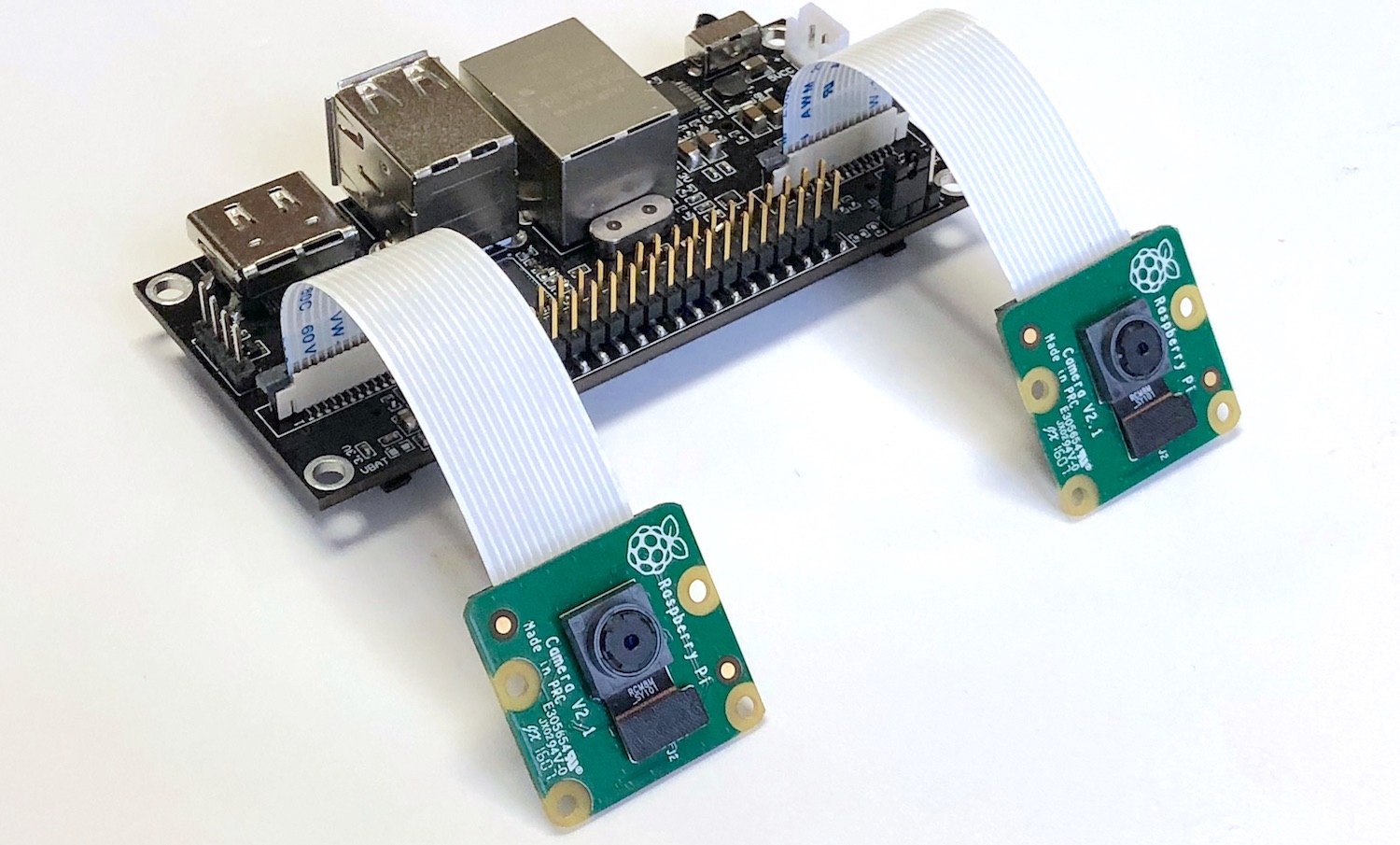
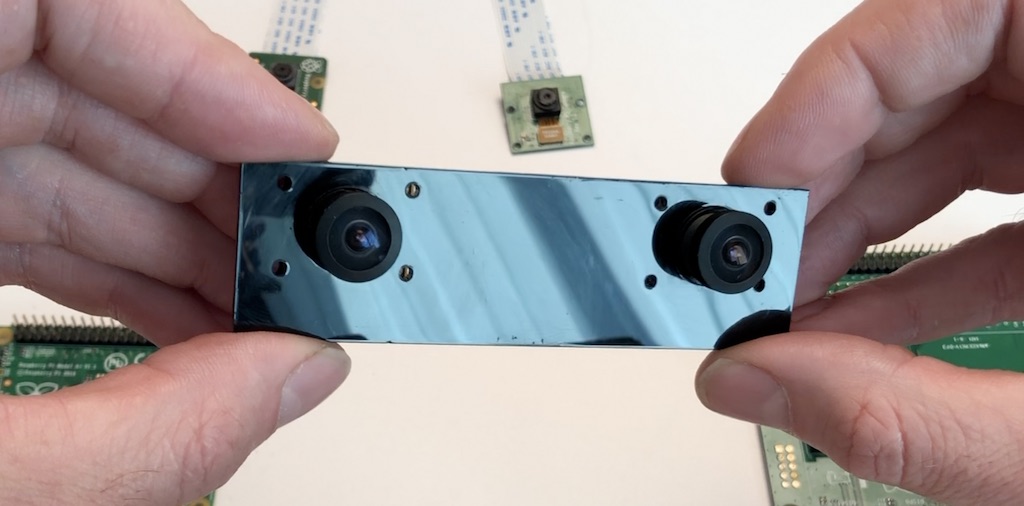
Front view:
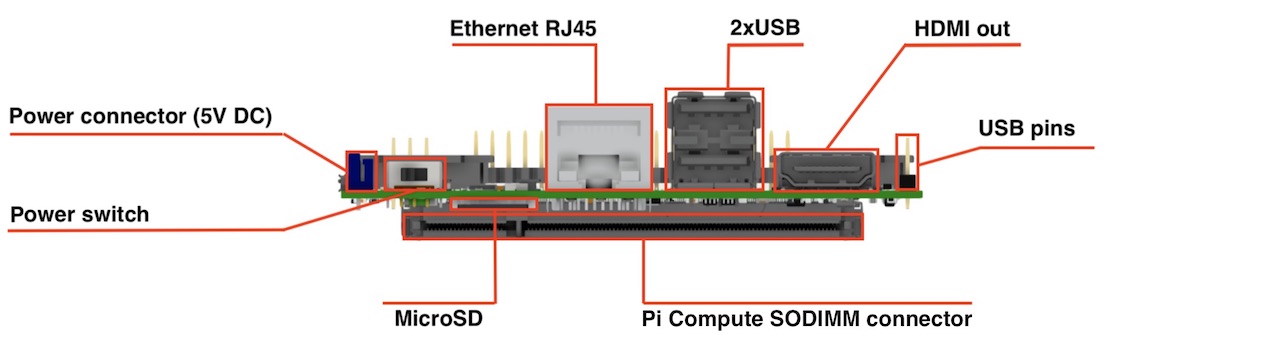
Top view:
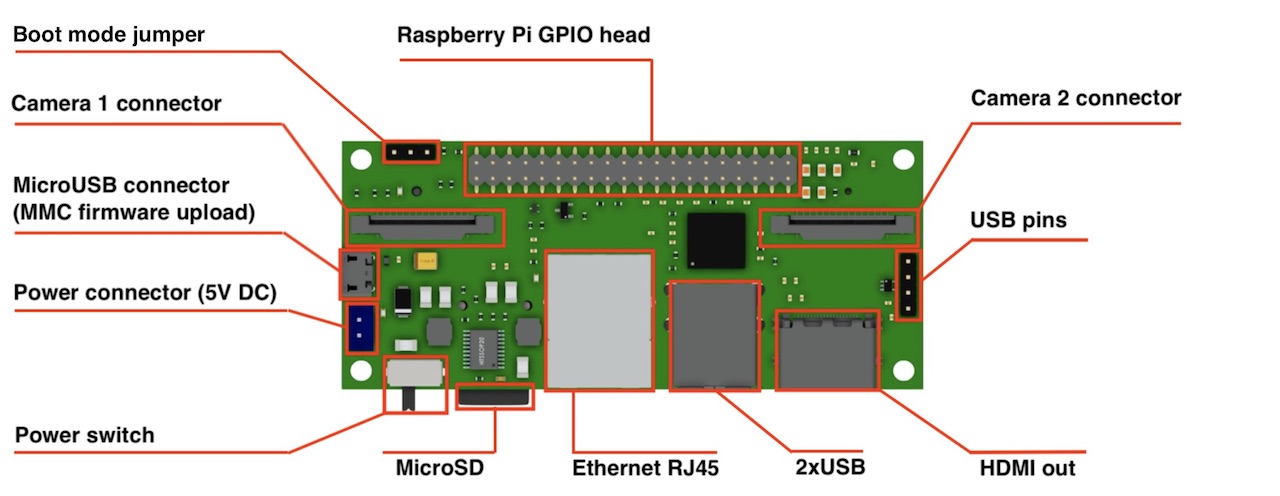
Dimensions: 90x40 mm
Camera: 2 x CSI 15 lanes cable
GPIO: 40 classic Raspberry PI GPIO
USB: 2 x USB type A, 1 USB on a pins
Ethernet: RJ45
Storage: Micro SD (for CM3 Lite)
Monitor: HDMI out
Power: 5V DC
Supported Raspberry Pi: Raspberry Pi Compute Module 3, Raspberry Pi CM 3 Lite, Raspberry Pi CM 1
Supported cameras: Raspberry Pi camera OV5647, Raspberry Pi camera Sony IMX 237, HDMI In (single mode)
Firmware update: MicroUSB connector
Power switch: Yes! No more connect-disconnect MicroUSB cable for power reboot!
Status: we have fully tested ready-to-production samples
Camera: 2 x CSI 15 lanes cable
GPIO: 40 classic Raspberry PI GPIO
USB: 2 x USB type A, 1 USB on a pins
Ethernet: RJ45
Storage: Micro SD (for CM3 Lite)
Monitor: HDMI out
Power: 5V DC
Supported Raspberry Pi: Raspberry Pi Compute Module 3, Raspberry Pi CM 3 Lite, Raspberry Pi CM 1
Supported cameras: Raspberry Pi camera OV5647, Raspberry Pi camera Sony IMX 237, HDMI In (single mode)
Firmware update: MicroUSB connector
Power switch: Yes! No more connect-disconnect MicroUSB cable for power reboot!
Status: we have fully tested ready-to-production samples
That’s all that I wanted to cover today. If you have any questions I will be glad to answer.
Project website is http://stereopi.com
https://www.crowdsupply.com/virt2real/stereopi
------
StereoPi - companion computer on Raspberry Pi with stereo video support
https://diydrones.com/profiles/blogs/stereopi-companion-computer-on-raspberry-pi-with-stereo-video-1
Compute Module 3 for playing with stereo video and OpenCV. It could be interesting for those who study computer vision or make drones and robots (3D FPV).
It works with a stock Raspbian, you only need to put a dtblob.bin file to a boot partition for enabling second camera. It means you can use raspivid, raspistill and other traditional tools for work with pictures and video.
JFYI stereo mode supported in Raspbian from 2014, you can read implementation story on Raspberry forum.
Before diving into the technical details let me show you some real work examples.
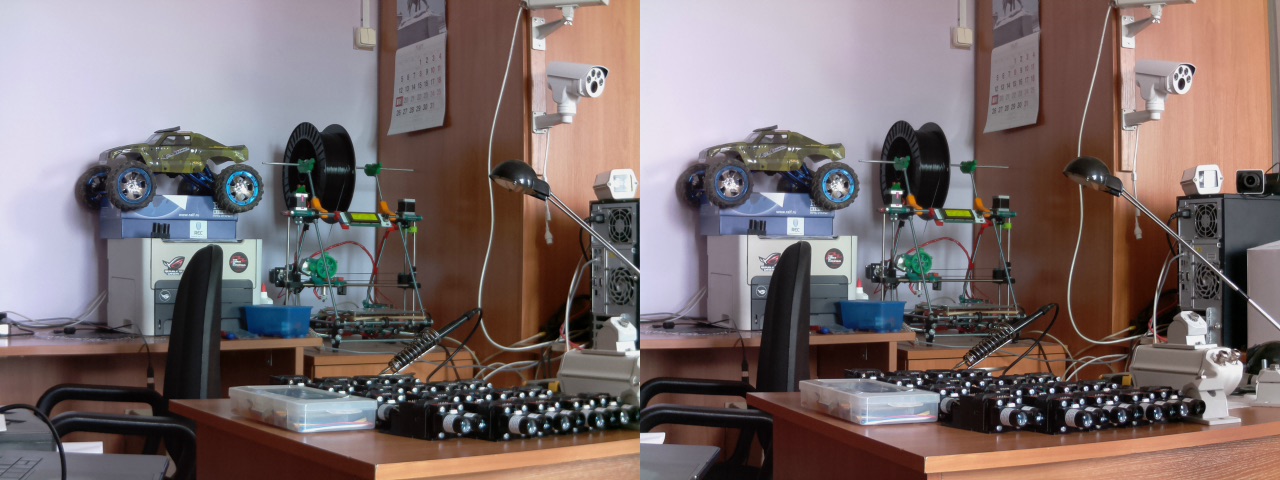
1. Capture image:
raspistill -3d sbs -w 1280 -h 480 -o 1.jpg
and you get this:
2. Capture video:
raspivid -3d sbs -w 1280 -h 480 -o 1.h264
and you get this:
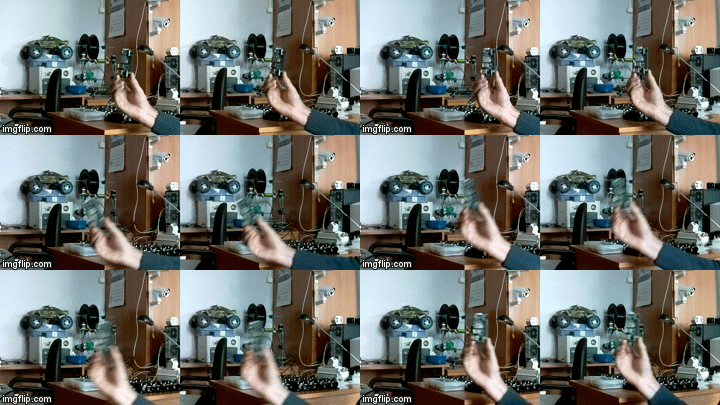
You can download original captured video fragment (converted to mp4) here.
3. Using Python and OpenCV you can experiment with depth map:
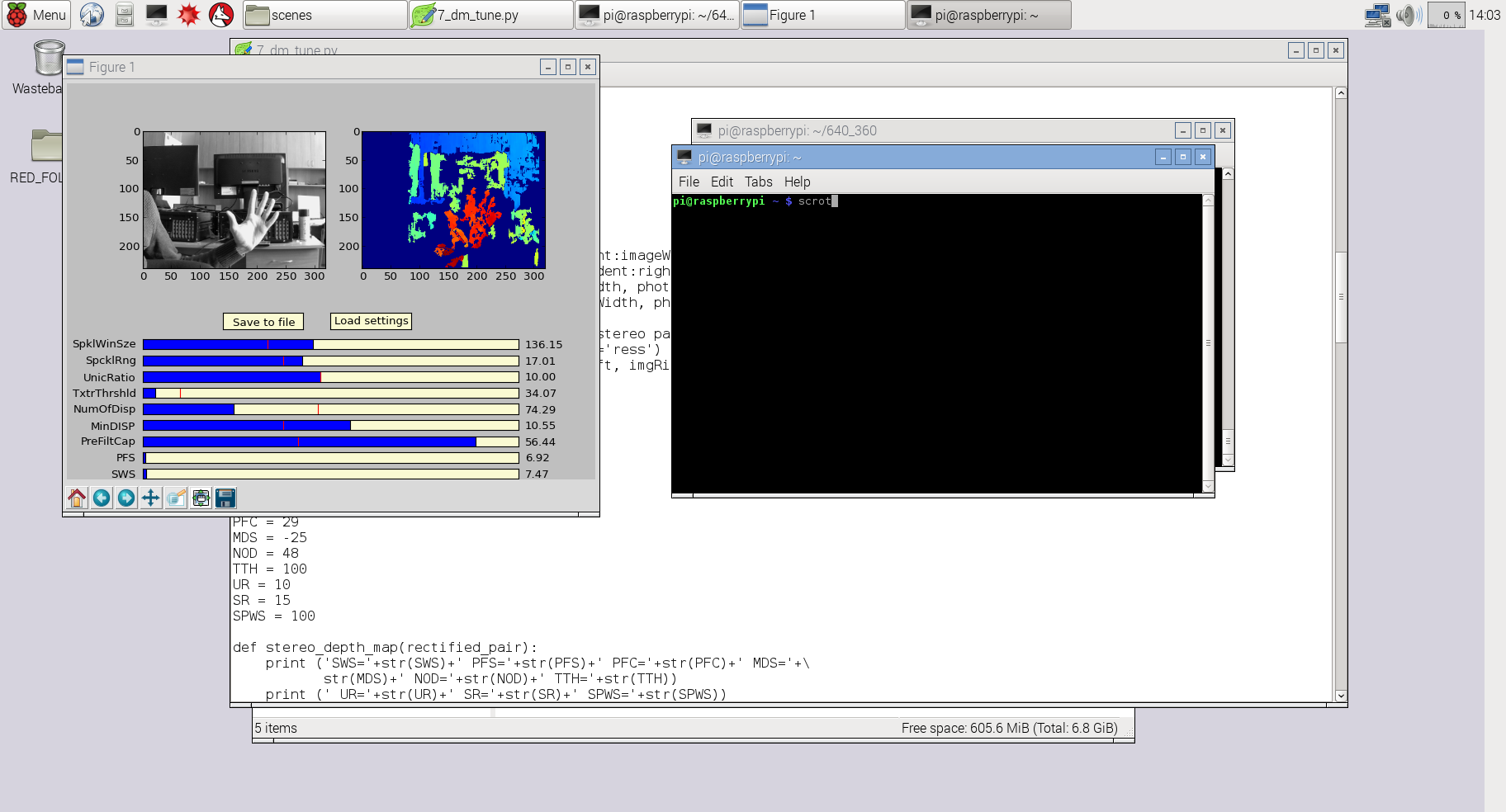
For this example I used slightly modified code from my previous project 3Dberry (https://github.com/realizator/3dberry-turorial)
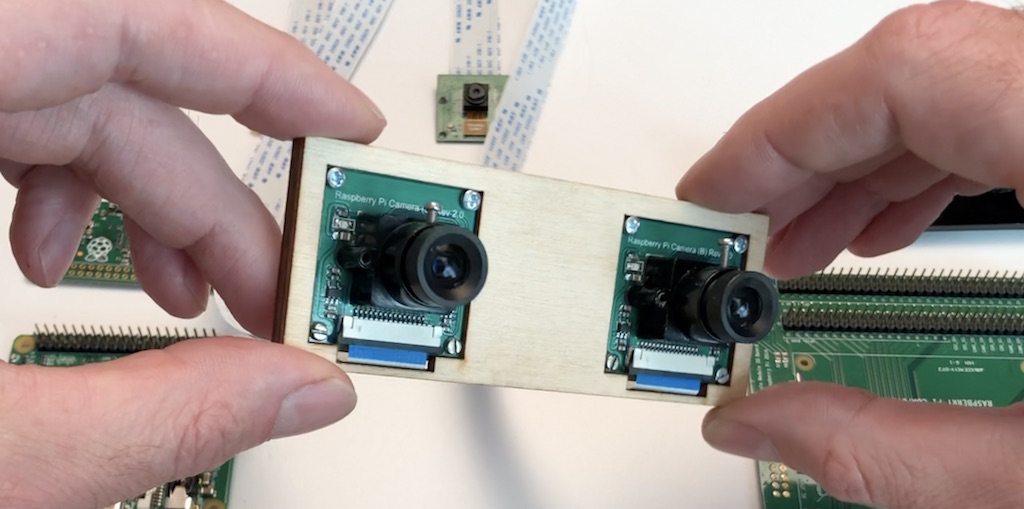
I used this pair of cameras for taking the pictures in examples above:
SLP (StereoPi Livestream Playground) Raspbian Image
https://github.com/realizator
https://github.com/realizator/StereoVision
https://github.com/realizator/stereopi-fisheye-robot
https://github.com/search?p=3&q=stereopi&type=Repositories
Monday, August 10, 2020
3D Stereoscopic Photography
http://3dstereophoto.blogspot.com/
the3dconverter2
Download Here:
http://3dstereophoto.blogspot.com/2019/11/2d-to-3d-image-conversion-software-3d.html
wigglemaker.
DMAG5
I have tried it yet, if you do, let me know.
the3dconverter2
Download Here:
http://3dstereophoto.blogspot.com/2019/11/2d-to-3d-image-conversion-software-3d.html
wigglemaker.
DMAG5
I have tried it yet, if you do, let me know.
Saturday, August 08, 2020
My old 3D stereo camera rig


Around year 2003.
2 NTSC bullet cameras commonly used in cctv, approx 60 fov.
It would go in to two of the CCTV dvr boards for experimentation.
2 NTSC bullet cameras commonly used in cctv, approx 60 fov.
It would go in to two of the CCTV dvr boards for experimentation.
Friday, August 07, 2020
High Efficiency Image File Format (HEIF)
https://en.wikipedia.org/wiki/High_Efficiency_Image_File_Format
High Efficiency Image File Format (HEIF) is a container format for individual images and image sequences. It was developed by the Moving Picture Experts Group (MPEG) and is defined as Part 12 within the MPEG-H media suite (ISO/IEC 23008-12). MPEG claims that a HEIF image using HEVC requires about half the storage space as the equivalent quality JPEG. HEIF also supports animation, and is capable of storing more information[citation needed] than an animated GIF or APNG at a small fraction of the size.
Introduced in 2015, HEIF was adopted by Apple in 2017 with the introduction of iOS 11, and support on other platforms is growing.
HEIF files are a special case of the ISO Base Media File Format (ISOBMFF, ISO/IEC 14496-12), first defined in 2001 as a shared part of MP4 and JPEG 2000. This file format standard covers multimedia files that can also include other media streams, such as timed text, audio and video.

HEIC And HEIF
HEIC is the container or file extension that holds HEIF images or sequences of images. HEIF borrows technology from the High Efficiency Video Compression (HEVC) codec, also known as h.265. Both HEVC and HEIF are proprietary technologies developed by the Moving Picture Experts Group (MPEG).
HEIF came into the mainstream when Apple made it the default format for its pictures on iOS11 devices and macOS High Sierra. However, other operating systems or websites don’t yet support HEIF and its HEIC file extension, so Apple’s operating systems will automatically convert the images to JPEG when users want to share them with friends who don’t use Apple products.
HEIC files can store not just multiple individual images, but also their image properties, HDR data, alpha and depth maps, and even their thumbnails.
Wednesday, August 05, 2020
New Live Streaming TV site.
http://pervasys.com/
Just a test site for now, but you can do channel changing.
If anyone has any live streaming video or audio URL's for youtube, twitch or else where please comment here and I will add them.
I just need an plain webpage or an URL I can drop in an iframe html tag.
Sunday, July 12, 2020
Exploring the Kanda QooCam 4K - pass1
I was hoping to get live streaming off this camera, and it would appear if you have a 64 Bit android device their app can see a live video feed?
There is a Live option on the windows app that appears to do nothing.
The USB doesn't show up as a video driver.
You can connect with the device over Wifi
To do this power on the device and wait for the power up tune to play.
one well timed (approx 1 second) power button push and it will beep and the blue wifi like will come on.
Scanning your wifi network SSID's, and you will see something like:
QOOCAM-06515
your camera id will vary based on the last 5 digits of the serial number.
password is : 12345678
From Linux, this command works but I was seeing many errors.
ffplay rtsp:192.168.1.1:554/live
sokol@nuc2:~/Desktop/vr180$ ffplay rtsp:192.168.1.1:554/live
ffplay version 2.8.15-0ubuntu0.16.04.1 Copyright (c) 2003-2018 the FFmpeg developers
built with gcc 5.4.0 (Ubuntu 5.4.0-6ubuntu1~16.04.10) 20160609
configuration: --prefix=/usr --extra-version=0ubuntu0.16.04.1 --build-suffix=-ffmpeg --toolchain=hardened --libdir=/usr/lib/x86_64-linux-gnu --incdir=/usr/include/x86_64-linux-gnu --cc=cc --cxx=g++ --enable-gpl --enable-shared --disable-stripping --disable-decoder=libopenjpeg --disable-decoder=libschroedinger --enable-avresample --enable-avisynth --enable-gnutls --enable-ladspa --enable-libass --enable-libbluray --enable-libbs2b --enable-libcaca --enable-libcdio --enable-libflite --enable-libfontconfig --enable-libfreetype --enable-libfribidi --enable-libgme --enable-libgsm --enable-libmodplug --enable-libmp3lame --enable-libopenjpeg --enable-libopus --enable-libpulse --enable-librtmp --enable-libschroedinger --enable-libshine --enable-libsnappy --enable-libsoxr --enable-libspeex --enable-libssh --enable-libtheora --enable-libtwolame --enable-libvorbis --enable-libvpx --enable-libwavpack --enable-libwebp --enable-libx265 --enable-libxvid --enable-libzvbi --enable-openal --enable-opengl --enable-x11grab --enable-libdc1394 --enable-libiec61883 --enable-libzmq --enable-frei0r --enable-libx264 --enable-libopencv
libavutil 54. 31.100 / 54. 31.100
libavcodec 56. 60.100 / 56. 60.100
libavformat 56. 40.101 / 56. 40.101
libavdevice 56. 4.100 / 56. 4.100
libavfilter 5. 40.101 / 5. 40.101
libavresample 2. 1. 0 / 2. 1. 0
libswscale 3. 1.101 / 3. 1.101
libswresample 1. 2.101 / 1. 2.101
libpostproc 53. 3.100 / 53. 3.100
[h264 @ 0x7f95580008c0] RTP: missed 129 packetsKB sq= 0B f=0/0
[h264 @ 0x7f95580008c0] RTP: missed 37 packets0KB sq= 0B f=0/0
[h264 @ 0x7f95580008c0] left block unavailable for requested intra mode at 0 44
[h264 @ 0x7f95580008c0] error while decoding MB 0 44, bytestream 659
[h264 @ 0x7f95580008c0] concealing 1969 DC, 1969 AC, 1969 MV errors in P frame
[h264 @ 0x7f95580008c0] RTP: missed 28 packets0KB sq= 0B f=0/0
[h264 @ 0x7f95580008c0] RTP: missed 41 packets0KB sq= 0B f=0/0
[h264 @ 0x7f95580008c0] RTP: missed 31 packets0KB sq= 0B f=0/0
[h264 @ 0x7f95580008c0] RTP: missed 27 packets0KB sq= 0B f=0/0
[h264 @ 0x7f95580008c0] RTP: missed 25 packets0KB sq= 0B f=0/0
[h264 @ 0x7f95580008c0] RTP: missed 121 packetsKB sq= 0B f=0/0
[h264 @ 0x7f95580008c0] RTP: missed 33 packets0KB sq= 0B f=0/0
[h264 @ 0x7f95580008c0] RTP: missed 65 packets0KB sq= 0B f=0/0
[h264 @ 0x7f95580008c0] RTP: missed 25 packets0KB sq= 0B f=0/0
[h264 @ 0x7f95580008c0] RTP: missed 33 packets0KB sq= 0B f=0/0
[h264 @ 0x7f95580008c0] RTP: missed 33 packets0KB sq= 0B f=0/0
[h264 @ 0x7f95580008c0] RTP: missed 29 packets0KB sq= 0B f=0/0
Input #0, rtsp, from 'rtsp:192.168.1.1:554/live': sq= 0B f=0/0
Metadata:
title : H.264 Video. Streamed by iCatchTek.
comment : H264
Duration: N/A, start: 0.801333, bitrate: N/A
Stream #0:0: Video: h264 (High), yuv420p, 1920x960, 15 fps, 14.99 tbr, 90k tbn, 30 tbc
[h264 @ 0x7f955812a200] left block unavailable for requested intra mode at 0 44
[h264 @ 0x7f955812a200] error while decoding MB 0 44, bytestream 659
[h264 @ 0x7f955812a200] concealing 1969 DC, 1969 AC, 1969 MV errors in P frame
[h264 @ 0x7f95580008c0] RTP: missed 41 packets9KB sq= 0B f=1/1
[h264 @ 0x7f95580008c0] RTP: missed 65 packets1KB sq= 0B f=1/1
[h264 @ 0x7f95580008c0] RTP: missed 25 packets2KB sq= 0B f=1/1
[h264 @ 0x7f95580008c0] RTP: missed 41 packets
[h264 @ 0x7f95580008c0] RTP: missed 33 packets
Last message repeated 1 times
[h264 @ 0x7f95580008c0] RTP: missed 161 packetsKB sq= 0B f=1/1
$ nmap -v -sN 192.168.1.1
Starting Nmap 7.70 ( https://nmap.org ) at 2020-07-06 08:11 ric
Initiating ARP Ping Scan at 08:11
Scanning 192.168.1.1 [1 port]
Completed ARP Ping Scan at 08:11, 2.16s elapsed (1 total hosts)
mass_dns: warning: Unable to determine any DNS servers. Reverse DNS is disabled. Try using --system-dns or specify valid servers with --dns-s
ervers
Initiating NULL Scan at 08:11
Scanning 192.168.1.1 [1000 ports]
Completed NULL Scan at 08:11, 6.23s elapsed (1000 total ports)
Nmap scan report for 192.168.1.1
Host is up (0.018s latency).
Not shown: 997 closed ports
PORT STATE SERVICE
21/tcp open|filtered ftp
554/tcp open|filtered rtsp
9200/tcp open|filtered wap-wsp
MAC Address: CC:4B:73:35:B4:2E (Ampak Technology)
Read data files from: C:\Program Files (x86)\Nmap
Nmap done: 1 IP address (1 host up) scanned in 15.72 seconds
Raw packets sent: 1004 (40.148KB) | Rcvd: 998 (39.908KB)
$ nmap -v -A 192.168.1.1
Starting Nmap 7.70 ( https://nmap.org ) at 2020-07-06 08:12 ric
NSE: Loaded 148 scripts for scanning.
NSE: Script Pre-scanning.
Initiating NSE at 08:12
Completed NSE at 08:12, 0.00s elapsed
Initiating NSE at 08:12
Completed NSE at 08:12, 0.00s elapsed
Initiating ARP Ping Scan at 08:12
Scanning 192.168.1.1 [1 port]
Completed ARP Ping Scan at 08:12, 2.46s elapsed (1 total hosts)
mass_dns: warning: Unable to determine any DNS servers. Reverse DNS is disabled. Try using --system-dns or specify valid servers with --dns-s
ervers
Initiating SYN Stealth Scan at 08:12
Scanning 192.168.1.1 [1000 ports]
Discovered open port 554/tcp on 192.168.1.1
Discovered open port 21/tcp on 192.168.1.1
Discovered open port 9200/tcp on 192.168.1.1
Completed SYN Stealth Scan at 08:12, 3.94s elapsed (1000 total ports)
Initiating Service scan at 08:12
Scanning 3 services on 192.168.1.1
Completed Service scan at 08:12, 6.01s elapsed (3 services on 1 host)
Initiating OS detection (try #1) against 192.168.1.1
Retrying OS detection (try #2) against 192.168.1.1
Retrying OS detection (try #3) against 192.168.1.1
Retrying OS detection (try #4) against 192.168.1.1
Retrying OS detection (try #5) against 192.168.1.1
NSE: Script scanning 192.168.1.1.
Initiating NSE at 08:13
Completed NSE at 08:13, 10.04s elapsed
Initiating NSE at 08:13
Completed NSE at 08:13, 0.00s elapsed
Nmap scan report for 192.168.1.1
Host is up (0.0042s latency).
Not shown: 997 closed ports
PORT STATE SERVICE VERSION
21/tcp open tcpwrapped
554/tcp open rtsp DoorBird video doorbell rtspd
9200/tcp open tcpwrapped
MAC Address: CC:4B:73:35:B4:2E (Ampak Technology)
No exact OS matches for host (If you know what OS is running on it, see https://nmap.org/submit/ ).
TCP/IP fingerprint:
OS:SCAN(V=7.70%E=4%D=7/6%OT=554%CT=1%CU=34247%PV=Y%DS=1%DC=D%G=Y%M=CC4B73%T
OS:M=5F02CF11%P=i686-pc-windows-windows)SEQ(CI=I%II=RI)ECN(R=N)T1(R=Y%DF=N%
OS:T=FF%S=O%A=S+%F=AS%RD=0%Q=)T1(R=N)T2(R=N)T3(R=N)T4(R=Y%DF=N%T=FF%W=E420%
OS:S=A%A=S%F=AR%O=%RD=0%Q=)T5(R=Y%DF=N%T=FF%W=E420%S=A%A=S+%F=AR%O=%RD=0%Q=
OS:)T6(R=Y%DF=N%T=FF%W=E420%S=A%A=S%F=AR%O=%RD=0%Q=)T7(R=Y%DF=N%T=FF%W=E420
OS:%S=A%A=S+%F=AR%O=%RD=0%Q=)U1(R=Y%DF=N%T=FF%IPL=38%UN=0%RIPL=G%RID=G%RIPC
OS:K=G%RUCK=G%RUD=G)IE(R=Y%DFI=S%T=FF%CD=S)
Network Distance: 1 hop
Service Info: Device: webcam
TRACEROUTE
HOP RTT ADDRESS
1 4.20 ms 192.168.1.1
NSE: Script Post-scanning.
Initiating NSE at 08:13
Completed NSE at 08:13, 0.01s elapsed
Initiating NSE at 08:13
Completed NSE at 08:13, 0.01s elapsed
Read data files from: C:\Program Files (x86)\Nmap
OS and Service detection performed. Please report any incorrect results at https://nmap.org/submit/ .
Nmap done: 1 IP address (1 host up) scanned in 52.54 seconds
Raw packets sent: 1241 (60.438KB) | Rcvd: 1047 (43.282KB)
$
Friday, April 13, 2018
Monday, November 28, 2016
Build hardware synchronized 360 VR camera with YI 4K action cameras
http://open.yitechnology.com/vrcamera.html
http://www.yijump.com/
YI 4K Action Camera is your perfect pick for building a VR camera. The camera boasts high resolution image detail powered by amazing video capturing and encoding capabilities, long battery life and camera geometry. This is what makes us stand out and how we are recognized and chosen as a partner by Google for its next version VR Camera, Google Jump - www.yijump.com

There are a number of ways to build a VR camera with YI 4K Action Cameras. The difference being mainly how you control multiple cameras to start and stop recordings. In general, we would like all cameras to start and stop recording synchronously so you can easily record and stitch your virtual reality video.
The easiest solution is to manually control the cameras one-by-one. It is convenient and quick however it doesn’t guarantee synchronized recording.
A better solution therefore is to make good use of Wi-Fi where all cameras are set to work in Wi-Fi mode and are connected to a smartphone hotspot or a Wi-Fi router. Once setup is done, you should be able to control all cameras with smartphone app through Wi-Fi. For details, please check out https://github.com/YITechnology/YIOpenAPI
Please note that this solution also comes with its limitations. For instance, when there are way too many cameras or Wi-Fi interference happens to be serious, controlling the cameras via smartphone app can sometimes fail. Also, synchronized video capturing is not guaranteed since Wi-Fi is not a real-time communication protocol.
You can also control all cameras with a Bluetooth-connected remote control. The limitations however are similar to that with Wi-F solution.
There are also solutions which try to synchronize video files offline after recording is finished. It is normally done by detecting the same audio signal or video motion in the video files and aligning them. Since this kind of the solutions do not control the recording start time, its synchronization error is at least 1 frame.
HARDWARE SYNCHRONIZED RECORDING
In this article, we will introduce a solution to solve synchronization problem using hardware. We do this by connecting all cameras using Multi Endpoint cable where recording start and stop commands are transmitted in real-time among the cameras, in turn, creating a high-resolution and synchronized virtual reality video.
Sunday, November 20, 2016

Saturday, September 05, 2015
Tiny 3D Camera Offers Brain Surgery Innovation
http://www.jpl.nasa.gov/news/news.php?feature=4702
Harish Manohara, principal investigator of the project at JPL, working in collaboration with surgeon Dr. Hrayr Shahinian at the Skull Base Institute in Los Angeles, who approached JPL to create this technology.
MARVEL's camera is a mere 0.2 inch (4 millimeters) in diameter and about 0.6 inch (15 millimeters) long. It is attached to a bendable "neck" that can sweep left or right, looking around corners with up to a 120-degree arc. This allows for a highly maneuverable endoscope.
http://www.skullbaseinstitute.com/press/adjustable-viewing-angle-endoscopic-brain-surgery.htm“Multi-Angle and Rear Viewing Endoscopic tooL” (MARVEL) denotes an auxiliary endoscope, now undergoing development, that a surgeon would use in conjunction with a conventional endoscope to obtain additional perspective.
http://neurosciencenews.com/marvel-3d-neurosurgery-camera-2573/
To operate on the brain, doctors need to see fine details on a small scale. A tiny camera that could produce 3-D images from inside the brain would help surgeons see more intricacies of the tissue they are handling and lead to faster, safer procedures.
An endoscope with such a camera is being developed at NASA’s Jet Propulsion Laboratory in Pasadena, California. MARVEL, which stands for Multi Angle Rear Viewing Endoscopic tooL, has been honored this week with the Outstanding Technology Development award from the Federal Laboratory Consortium. An endoscope is a device that examines the interior of a body part.
“With one of the world’s smallest 3-D cameras, MARVEL is designed for minimally invasive brain surgery,” said Harish Manohara, principal investigator of the project at JPL. Manohara is working in collaboration with surgeon Dr. Hrayr Shahinian at the Skull Base Institute in Los Angeles, who approached JPL to create this technology.
MARVEL’s camera is a mere 0.2 inch (4 millimeters) in diameter and about 0.6 inch (15 millimeters) long. It is attached to a bendable “neck” that can sweep left or right, looking around corners with up to a 120-degree arc. This allows for a highly maneuverable endoscope.
Operations with the small camera would not require the traditional open craniotomy, a procedure in which surgeons take out large parts of the skull. Craniotomies result in higher costs and longer stays in hospitals than surgery using an endoscope.
Stereo imaging endoscopes that employ traditional dual-camera systems are already in use for minimally invasive surgeries elsewhere in the body. But surgery on the brain requires even more miniaturization. That’s why, instead of two, MARVEL has only one camera lens.
To generate 3-D images, MARVEL’s camera has two apertures — akin to the pupil of the eye — each with its own color filter. Each filter transmits distinct wavelengths of red, green and blue light, while blocking the bands to which the other filter is sensitive. The system includes a light source that produces all six colors of light to which the filters are attuned. Images from each of the two sets are then merged to create the 3-D effect.

A laboratory prototype of MARVEL, one of the world’s smallest 3-D cameras. MARVEL is in the center foreground. On the display is a 3-D image of the interior of a walnut, taken by MARVEL previously, which has characteristics similar to that of a brain. Credit: NASA/JPL-Caltech/Skull Base Institute.
Now that researchers have demonstrated a laboratory prototype, the next step is a clinical prototype that meets the requirements of the U.S. Food and Drug Administration. The researchers will refine the engineering of the tool to make it suitable for use in real-world medical settings.
In the future, the MARVEL camera technology could also have applications for space exploration. A miniature camera such as this could be put on small robots that explore other worlds, delivering intricate 3-D views of geological features of interest.
“You can implement a zoom function and get close-up images showing the surface roughness of rock and other microscopic details,” Manohara said.
“As a skull base surgeon with a specific vision of endoscopic brain surgery, it has been a privilege and a great personal honor working with the JPL team over the past eight years to realize this project,” Shahinian said.
MARVEL is being developed at JPL for the Skull Base Institute, which has licensed the technology from the California Institute of Technology. JPL is managed for NASA by Caltech.
Source: Elizabeth Landau – NASA’s Jet Propulsion Laboratory
Thursday, December 04, 2014
Paolo Favaro: Portable Light Field Imaging: Extended Depth of Field, Ali...
From ICCP11 Hosted by Carnegie Mellon University, Robotics Institute
April 8, 2011
Abstract:
Portable light field cameras have demonstrated capabilities beyond conventional cameras. In a single snapshot, they enable digital image refocusing, i.e., the ability to change the camera focus after taking the snapshot, and 3D reconstruction. We show that they also achieve a larger depth of field while maintaining the ability to reconstruct detail at high resolution. More interestingly, we show that their depth of field is essentially inverted compared to regular cameras. Crucial to the success of the light field camera is the way it samples the light field, trading off spatial vs. angular resolution, and how aliasing affects the light field. We present a novel algorithm that estimates a full resolution sharp image and a full resolution depth map from a single input light field image. The algorithm is formulated in a variational framework and it is based on novel image priors designed for light field images. We demonstrate the algorithm on synthetic and real images captured with our own light field camera, and show that it can outperform other computational camera systems.
Bio:
Paolo Favaro received the D.Ing. degree from Universita di Padova, Italy in 1999, and the M.Sc. and Ph.D. degree in electrical engineering from Washington University in St. Louis in 2002 and 2003 respectively. He was a postdoctoral researcher in the computer science department of the University of California, Los Angeles and subsequently in Cambridge University, UK. Dr. Favaro is now lecturer (assistant professor) in Heriot-Watt University and Honorary Fellow at the University of Edinburgh, UK. His research interests are in computer vision, computational photography, machine learning, signal and image processing, estimation theory, inverse problems and variational techniques. He is also a member of the IEEE Society.
Tuesday, December 02, 2014
Intel post promotional videos for its 3D camera-based RealSense
Another Two Video Promotions from Intel
Intel keeps posting promotional videos for its 3D camera-based RealSense technology. The first one shows refocusing capability similar to Lytro, Pelican Imaging and some Nokia products:
second video demos 3D scanning:
http://www.intel.com/content/www/us/en/architecture-and-technology/realsense-overview.html
https://software.intel.com/en-us/realsense/home Intel® RealSense™ Developer Kit.
Intel keeps posting promotional videos for its 3D camera-based RealSense technology. The first one shows refocusing capability similar to Lytro, Pelican Imaging and some Nokia products:
second video demos 3D scanning:
http://www.intel.com/content/www/us/en/architecture-and-technology/realsense-overview.html
https://software.intel.com/en-us/realsense/home Intel® RealSense™ Developer Kit.
Subscribe to:
Comments (Atom)
