Showing posts with label virtual reality. Show all posts
Showing posts with label virtual reality. Show all posts
Thursday, January 21, 2021


Friday, January 01, 2021
Wednesday, August 12, 2020
What is OSVR?
https://en.wikipedia.org/wiki/Open_Source_Virtual_Reality
https://osvr.github.io/
OSVR presentation at Boston VR meetup Jul 2015
OSVR Software Framework - Core - April 2015
OSVR is an open-source software platform for virtual and augmented reality. It allows discovery, configuration and operation of hundreds of VR/AR devices and peripherals. OSVR supports multiple game engines, and operating systems and provides services such as asynchronous time warp and direct mode in support of low-latency rendering. OSVR software is provided free under Apache 2.0 license and is maintained by Sensics.
NOLO Instructions: Use NOLO with OCULUS DK2 to play SteamVR
https://www.youtube.com/watch?v=qgL7NHixIX8
https://www.nolovr.com/ocdk2
https://osvr.github.io/
OSVR presentation at Boston VR meetup Jul 2015
OSVR Software Framework - Core - April 2015
OSVR is an open-source software platform for virtual and augmented reality. It allows discovery, configuration and operation of hundreds of VR/AR devices and peripherals. OSVR supports multiple game engines, and operating systems and provides services such as asynchronous time warp and direct mode in support of low-latency rendering. OSVR software is provided free under Apache 2.0 license and is maintained by Sensics.
Looks like this was all starting in the 2016 VR Boom and Sensics founded in the late 1990’s for VR development looks like the website went down in the middle of 2019, Their domain was dead and now hijacked. Yuval Boger the CEO left Feb 2018.
https://www.reddit.com/r/OSVR/comments/bgby9y/what_happened_to_osvr_read_me_if_youre_new/
https://www.reddit.com/r/OSVR/comments/bgby9y/what_happened_to_osvr_read_me_if_youre_new/
Sometime quite a while ago (early 2018 maybe?) I was informed in a personal email conversation with a Razer employee that Razer’s team was no longer focusing on OSVR, and instead had directed their efforts to supporting OpenXR.
More recently, I was directed to this tweet by former Sensics employee JeroMiya, which seems to indicate that Sensics, the other major OSVR partner, has dissolved.
What is OSVR?
OSVR or Open Source Virtual Reality is a software platform that allows different types of VR technologies to reside on the same ecosystem. This means end to end compatibility across different brands and devices, allowing you to use any OSVR supported HMDs, controllers and other technologies together, giving you the ability to customize the combination of hardware you’d like to use.
Think of OSVR as a software that allows you to customize your VR rig the same way you can customize your PC. When buying a PC it doesn’t matter what brand of monitor, printer, keyboard, graphics card or CPU you want to use – they all work together, allowing you to get a truly customized experience.
This is what OSVR is driving for the VR industry and to date it is the world’s most supported open VR ecosystem. It puts the power of choice in your hands.
Think of OSVR as a software that allows you to customize your VR rig the same way you can customize your PC. When buying a PC it doesn’t matter what brand of monitor, printer, keyboard, graphics card or CPU you want to use – they all work together, allowing you to get a truly customized experience.
This is what OSVR is driving for the VR industry and to date it is the world’s most supported open VR ecosystem. It puts the power of choice in your hands.
NOLO Instructions: Use NOLO with OCULUS DK2 to play SteamVR
https://www.youtube.com/watch?v=qgL7NHixIX8
https://www.nolovr.com/ocdk2
Thursday, August 06, 2020
Qualcomm drops a BOMB on the VR Industry
Qualcomm had a press announcement this morning and the embargos have finally dropped. We are in for an entirely new wave of VR like we have ever seen. This.. is very well what we could have called VR 2.0 way back, but it's nothing like what I had expected. Over 15 companies have decided to work together for VR to go mainstream along with 5g adaptations. Lets see where this goes! new headsets, 5g, wireless, cheap.. exciting.
Here what i covered today:
Qualcomm press anounement regarding AR and VR ( XR ):
https://www.qualcomm.com/news/release...
HTC Former CEO forms a new VR company (XRSpace; Mova):
https://www.theverge.com/2020/5/26/21...
XRSpace Ready Player One like VR world:
https://www.techradar.com/news/xrspac...
Ford VR designed car:
https://fordauthority.com/2020/05/new...
HP reverb G2 leaks:
https://www.roadtovr.com/rumor-leaked...
Blastworld SteamVR page:
https://store.steampowered.com/app/11...
Outtro music artist:
Protostar- Overdrive
https://open.spotify.com/track/3Qifig...
Monday, August 03, 2020
Basis Universal : Supercompressed GPU Video Texture Codec
I was poking about inside Mozilla's big WebXR demo to see how it was made.
https://mixedreality.mozilla.org/hello-webxr/
Most of the assets are xxx.basis files. ".basis" I had never heard of a dot basis file and not much came up on the internet.
Digging deeper I found a compiled Web Assembly Library and a javascript library wrapper for it.
60935 basis_transcoder.js
367268 basis_transcoder.wasm
They also used Draco which is also interesting for 3D object compression.
In further searching it's starting to look like this basis codec is going to be a standard part of three.js and therefore aframe.io for web based VR development.
Basis Universal GPU Texture Compression
texture video compression system that outputs a highly
compressed intermediate file format (.basis) that can be quickly transcoded to
a wide variety of GPU texture compression formats.
basis_universal
Basis Universal Supercompressed GPU Texture Codec
Basis Universal is a "supercompressed" GPU texture compression system that outputs a highly compressed intermediate file format (.basis) that can be quickly transcoded to a very wide variety of GPU compressed and uncompressed pixel formats: ASTC 4x4 L/LA/RGB/RGBA, PVRTC1 4bpp RGB/RGBA, PVRTC2 RGB/RGBA, BC7 mode 6 RGB, BC7 mode 5 RGB/RGBA, BC1-5 RGB/RGBA/X/XY, ETC1 RGB, ETC2 RGBA, ATC RGB/RGBA, ETC2 EAC R11 and RG11, FXT1 RGB, and uncompressed raster image formats 8888/565/4444.
The system now supports two modes: a high quality mode which is internally based off the UASTC compressed texture format, and the original lower quality mode which is based off a subset of ETC1 called "ETC1S". UASTC is for extremely high quality (similar to BC7 quality) textures, and ETC1S is for very small files. The ETC1S system includes built-in data compression, while the UASTC system includes an optional Rate Distortion Optimization (RDO) post-process stage that conditions the encoded UASTC texture data in the .basis file so it can be more effectively LZ compressed by the end user. More technical details about UASTC integration are here.
Basis files support non-uniform texture arrays, so cubemaps, volume textures, texture arrays, mipmap levels, video sequences, or arbitrary texture "tiles" can be stored in a single file. The compressor is able to exploit color and pattern correlations across the entire file, so multiple images with mipmaps can be stored very efficiently in a single file.
The system's bitrate depends on the quality setting and image content, but common usable ETC1S bitrates are .3-1.25 bits/texel. ETC1S .basis files are typically 10-25% smaller than using RDO texture compression of the internal texture data stored in the .basis file followed by LZMA. For UASTC files, the bitrate is fixed at 8bpp, but with RDO post-processing and user-provided LZ compression on the .basis file the effective bitrate can be as low as 2bpp for video or for individual textures approximately 4-6bpp.
The transcoder has been fuzz tested using zzuf.
So far, we've compiled the code using MSVS 2019, under Ubuntu x64 using cmake with either clang 3.8 or gcc 5.4, and emscripten 1.35 to asm.js. (Be sure to use this version or later of emcc, as earlier versions fail with internal errors/exceptions during compilation.) The compressor is multithreaded by default, but this can be disabled using the -no_multithreading command line option. The transcoder is currently single threaded.
Basis Universal supports "skip blocks" in ETC1S compressed texture arrays, which makes it useful for basic compressed texture video applications. Note that Basis Universal is still at heart a GPU texture compression system, not a video codec, so bitrates will be larger than even MPEG1.
Important Usage Notes
Probably the most important concept to understand about Basis Universal before using it: The system supports two very different universal texture modes: The original "ETC1S" mode is low/medium quality, but the resulting file sizes are very small because the system has built-in compression for ETC1S texture format files. This is the command line encoding tool's default mode. ETC1S textures work best on images, photos, map data, or albedo/specular/etc. textures, but don't work as well on normal maps. There's the second "UASTC" mode, which is significantly higher quality (near-BC7 grade), and is usable on all texture types including complex normal maps. UASTC mode purposely does not have built-in file compression like ETC1S mode does, so the resulting files are quite large (8-bits/texel - same as BC7) compared to ETC1S mode. The UASTC encoder has an optional Rate Distortion Optimization (RDO) encoding mode (implemented as a post-process over the encoded UASTC texture data), which lowers the output data's entropy in a way that results in better compression when UASTC .basis files are compressed with Deflate/Zstd, etc. In UASTC mode, you must losslessly compress the file yourself.
Basis Universal is not an image compression codec. It's a texture compression codec. It can be used just like an image compression codec, but that's not the only use case. Here's a good intro to GPU texture compression. If you're looking to primarily use the system as an image compression codec on sRGB photographic content, use the default ETC1S mode, because it has built-in compression.
The "-q X" option controls the output quality in ETC1S mode. The default is quality level 128. "-q 255" will increase quality quite a bit. If you want even higher quality, try "-max_selectors 16128 -max_endpoints 16128" instead of -q. -q internally tries to set the codebook sizes (or the # of quantization intervals for endpoints/selectors) for you. You need to experiment with the quality level on your content.
For tangent space normal maps, you should separate X into RGB and Y into Alpha, and provide the compressor with 32-bit/pixel input images. Or use the "-separate_rg_to_color_alpha" command line option which does this for you. The internal texture format that Basis Universal uses (ETC1S) doesn't handle tangent space normal maps encoded into RGB well. You need to separate the channels and recover Z in the pixel shader using z=sqrt(1-x^2-y^2).
3rd party code dependencies
The stand-alone transcoder (in the "transcoder" directory) is a single .cpp source file library which has no 3rd party code dependencies.
The encoder uses lodepng for loading and saving PNG images, which is Copyright (c) 2005-2019 Lode Vandevenne. It uses the zlib license. It also uses apg_bmp for loading BMP images, which is Copyright 2019 Anton Gerdelan. It uses the Apache 2.0 license.
The encoder uses tcuAstcUtil.cpp, from the Android drawElements Quality Program (deqp) Testing Suite, for unpacking the transcoder's ASTC output for testing/validation purposes. This code is Copyright 2016 The Android Open Source Project, and uses the Apache 2.0 license. We have modified the code so it has no external dependencies, and disabled HDR support.
This package uses BASIS and discusses is a little.
Friday, July 31, 2020
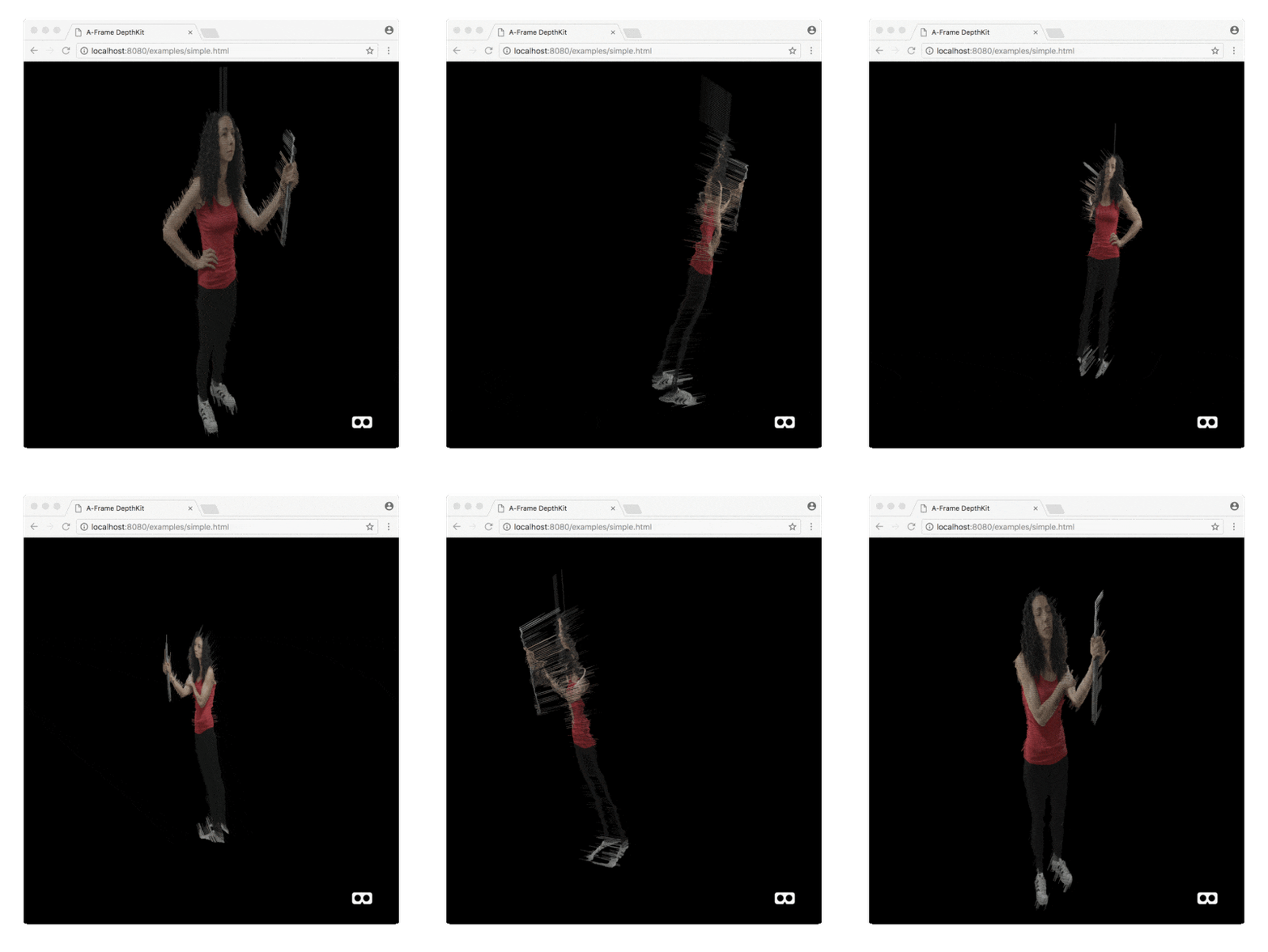
DepthKit - Depth Image Video - Free Viewpoint video. volumetric video
https://www.depthkit.tv/
 DepthKit for AFrame
An A-Frame component for rendering Volumetric videos captured using DepthKit (i.e Kinect + DSLR) in WebVR. The component wraps DepthKit.js which provides a similar interface for Three.js projects.
https://github.com/juniorxsound/DepthKit-A-Frame
https://orfleisher.com/aframe
https://github.com/juniorxsound/DepthKit-for-Max
DepthKit for Max/Msp/Jitter
A sample Max patch demonstrating a workflow for playing volumetric video in Max/Msp/Jitter using DepthKit combined-per-pixel exports. Supports rendering a mesh, wireframe and points.

Thursday, July 30, 2020
Seurat : system for image-based scene simplification for VR
https://developers.google.com/vr/discover/seurat
Optimizing for 6DOF mobile VR with Google's Seurat


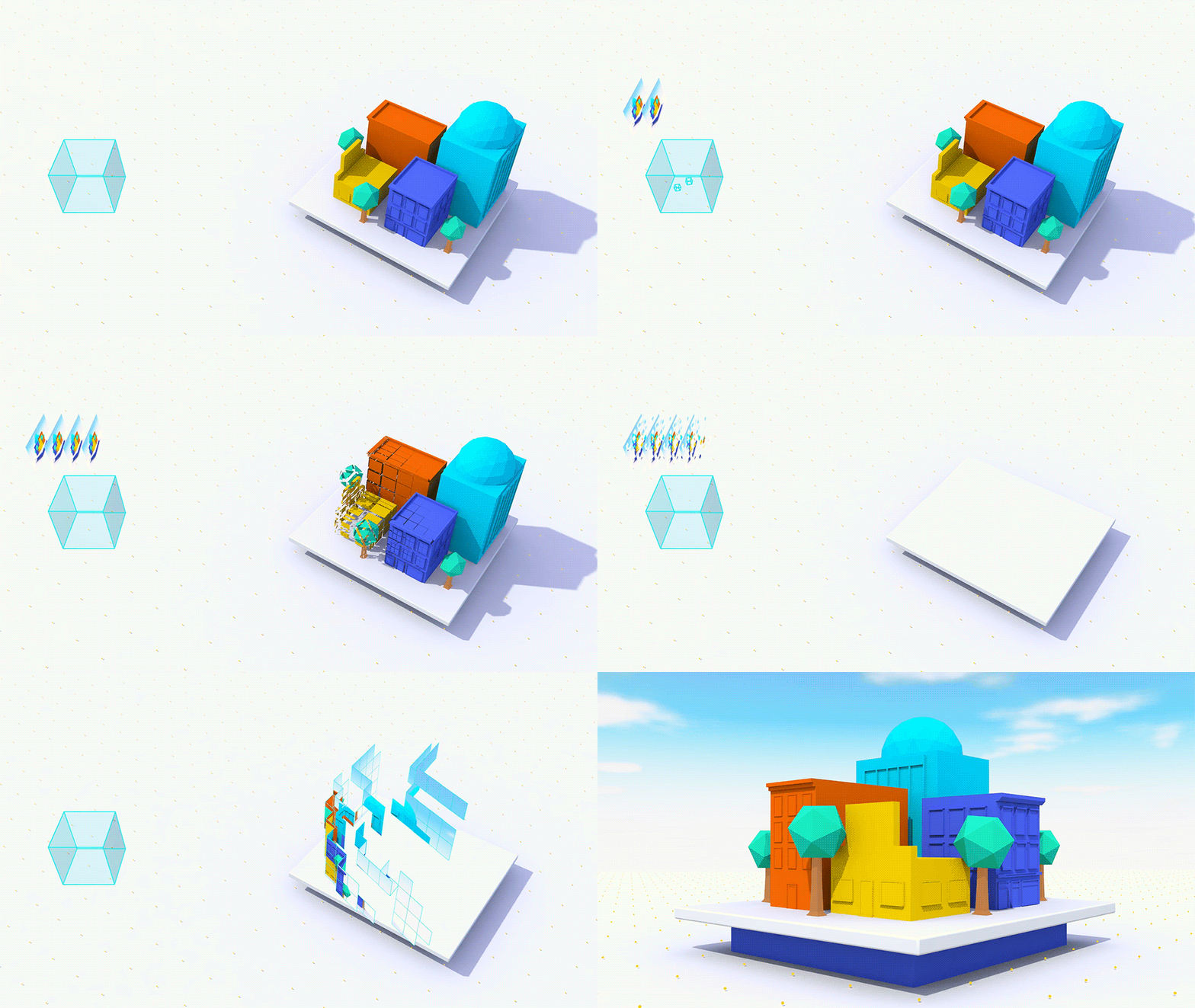
I lifted this from a 3D photo off facebook. Still trying to make sense of it...
You can see this image have been broken in to subimages, I suspect these are mapped on to various planes with different Z buffer levels, something that renders quickly in webgl.
Seurat
Seurat is a scene simplification technology designed to process very complex 3D scenes into a representation that renders efficiently on mobile 6DoF VR systems.
Seurat works by taking advantage of the fact that VR scenes are typically viewed from within a limited viewing region (the box on the left below), and leverages this to optimize the geometry and textures in your scene.
It takes RGBD images (color and depth) as input and generates a textured mesh, targeting a configurable number of triangles, texture size, and fill rate, to simplify scenes beyond what traditional methods can achieve.
Seurat is available as an open source project on GitHub, and includes plugin support for generating depth images for scenes in both Unity and Unreal.
Seurat - Documentation
What is Seurat?
Seurat is a system for image-based scene simplification for VR. It converts complex 3D scenes with millions of triangles, including complex lighting and shading effects, into just tens of thousands of triangles that can be rendered very efficiently on 6DOF devices with little loss in visual quality. It delivers high fidelity graphics on mobile VR devices. (One way to think of it is as a serving the same role as stereo panoramas on 3DoF VR devices, on 6DoF devices.)
The processing pipeline for static environments generates data for a single headbox (e.g. 1 m³ of space). Input data can be generated with any rendering system, e.g. a real-time game engine or an offline ray tracer. We have plugins for Unity, Unreal and Maya. Seurat outputs a mesh with an RGBA texture atlas, which can be rendered in any real-time engine. Dynamic content can be composited on top of the static Seurat environments.
Optimizing for 6DOF mobile VR with Google's Seurat


I lifted this from a 3D photo off facebook. Still trying to make sense of it...
You can see this image have been broken in to subimages, I suspect these are mapped on to various planes with different Z buffer levels, something that renders quickly in webgl.
----
Another Blog post on Seurat
http://raytracey.blogspot.com/2017/05/practical-light-field-rendering.html
http://raytracey.blogspot.com/2017/05/practical-light-field-rendering.html
Tuesday, January 23, 2018
Facebook Oculus invented a new time unit called the ‘flick’
A flick (frame-tick) is a very small unit of time. It is 1/705600000 of a second, exactly.
1 flick = 1/705600000 secondHere’s a list of numbers into which 1/706,600,000 divides evenly: 8, 16, 22.05, 24, 25, 30, 32, 44.1, 48, 50, 60, 90, 100, 120.
Motivation
When working creating visual effects for film, television, and other media, it is common to run simulations or other time-integrating processes which subdivide a single frame of time into a fixed, integer number of subdivisions. It is handy to be able to accumulate these subdivisions to create exact 1-frame and 1-second intervals, for a variety of reasons.
Knowing that you should never, ever use floating point representations for accumulated, simulated time (lest your temporal accuracy degrade over time), the std::chrono time tools in C++ are ideal. However, the highest usable resolution, nanoseconds, doesn't evenly divide common film & media framerates. This was the genesis of this unit.
https://github.com/OculusVR/Flickshttps://techcrunch.com/2018/01/22/facebook-invented-a-new-time-unit-called-the-flick-and-its-truly-amazing
Saturday, July 29, 2017
Altspace VR closes
https://www.wired.com/story/altspace-vr-closes/
Altspace tweeted the unexpected news: ”It is with tremendously heavy hearts that we must let you know that we are closing down AltspaceVR very soon.” The site had been unable to close its latest round of funding, it elaborated in a blog post, and will be shutting down next week.
Altspace tweeted the unexpected news: ”It is with tremendously heavy hearts that we must let you know that we are closing down AltspaceVR very soon.” The site had been unable to close its latest round of funding, it elaborated in a blog post, and will be shutting down next week.
Sunday, June 18, 2017
Road to the Holodeck: Lightfields and Volumetric VR
It's come and gone, but it looked to be very interesting.
https://www.eventbrite.com/e/road-to-the-holodeck-lightfields-and-volumetric-vr-tickets-34087827610#
What's a lightfield, you ask?
Several technologies are required for VR's holy grail: the fabled holodeck. We already have graphical VR experiences that let us move throughout volumentric spaces, such as video games. And we have photorealistic media that lets us look around a 360 plane from a fixed position (a.k.a. head tracking).
But what about the best of both worlds?
We're talking volumetric spaces in which you can move around, but are also photorealistic. In addition to things like positional tracking and lots of processing horsepower, the heart of this vision is lightfields. They define how photons hit our eyes and render what we see.
Because it's a challenge to capture photorealistic imagery from every possible angle in a given space -- as our eyes do in real reality -- the art of lightfields in VR involves extrapolating many vantage points, once a fixed point is captured. And that requires clever algorithms, processing, and whole lot of data.
Thursday, June 01, 2017
Kopin & Goertek Reveal Smallest VR Headset w/ /2Kx2K Res @120 Hz
The Smallest VR Headset - about Half the Size and Weight of Traditional devices - offers Cinema-like Image Quality

Kopin and Goertek are unveiling its groundbreaking VR headset reference design codenamed Elf VR at AWE. The new design will eliminate the barriers that have long stood in the way of delivering an effective VR experience and overcomes limitations related to uncomfortably bulky and heavy headset designs, low resolution and sluggish framerates and the annoying screen door effect. The new Elf reference design features Kopin’s “LightningTM” OLED microdisplay panel offering an incredible 2048 x 2048 resolution in each eye - more than three-times the resolution of Oculus Rift or HTC Vive, and at an unbelievable pixel density of 2,940 pixels per inch, five-times more than standard displays.
In addition, the panel runs at 120 Hz refresh rate, 33% faster than what traditional HMDs offer - for reduced motion blur, latency and flicker. As a result, nausea and fatigue are eliminated. Because Kopin’s panel is OLED-based and has integrated driver circuits, it requires much less power, battery life can be extended, and heat output is substantially reduced.

The Smallest VR Headset - about Half the Size and Weight of Traditional devices - offers Film-like Images
SANTA CLARA, CA – June 1st, 2017 - Kopin Corporation (NASDAQ:KOPN) (“Kopin”) today kicked off the era of of Seamless Virtual Reality. On stage at Augmented World Expo, the Company showcased a groundbreaking reference design, codenamed Elf VR, for a new Head-Mounted Display created with its partner Goertek Inc. (“Goertek”), the world leader in VR headset manufacturing.
When brought to market, the new design will eliminate the barriers that have long stood in the way of delivering an effective VR experience. In fact, traditional attempts at VR headsets have been uncomfortably bulky and heavy, while low resolution and sluggish framerates caused screen door effect and nausea, making them usable for only tens of minutes at a time at best.
Kopin’s Lightning Display – A new approach to VR
To resolve these issues, Kopin’s engineers utilized its three decades of display experience to create “LightningTM” OLED microdisplay panel, putting an end to the dreaded screen-door effect, with 2048 x 2048 resolution in each eye, more than three times the resolution of Oculus Rift or HTC Vive, and at an unbelievable pixel density of 2,940 pixels per inch, five times more than standard displays.
Kopin first showcased its Lightning display at CES 2017, to overwhelming acclaim and a coveted CES Innovation Award. PC Magazine wrote that “the most advanced display I saw came from Kopin” and Anandtech said “Seeing is believing…I quite literally could not see anything resembling aliasing on the display even with a 10x loupe to try and look more closely.”
In addition, the panel runs at 120 Hz refresh rate, 33% faster than what traditional HMDs offer - for reduced motion blur, latency and flicker. As a result, nausea and fatigue are eliminated. Because Kopin’s panel is OLED-based and has integrated driver circuits, it requires much less power, battery life can be extended, and heat output is substantially reduced.
“It is now time for us to move beyond our conventional expectation of what virtual reality can be and strive for more,” explained Kopin founder and CEO John Fan. “Great progress has been made this year, although challenges remain. This reference design, created with our partner Goertek, is a significant achievement. It is much lighter and fully 40% smaller than standard solutions, so that it can be worn for long periods without discomfort. At the same time, our OLED microdisplay panel achieves such high resolution and frame rate that it deliver a VR experience that truly approaches reality for markets including gaming, pro applications or film.”
In addition to the game-changing new design, Kopin previously announced an alliance with BOE Technology Group Co. Ltd. (BOE) and Yunan OLiGHTEK Opto-Electronic Technology Co.,Ltd. for OLED display manufacturing. As part of that alliance, all parties will contribute up to $150 million to establish a high-volume, state of the art facility to manufacture OLED micro-displays to support the growing AR and VR markets. The new facility, which would be the world’s largest OLED-on-silicon manufacturing center, will be managed by BOE and is expected to be built in Kunming, Yunnan Province, China over the next two years. BOE is the world leader in display panels for mobile phone and tablets.
Technical specs:
Kopin and Goertek are unveiling its groundbreaking VR headset reference design codenamed Elf VR at AWE. The new design will eliminate the barriers that have long stood in the way of delivering an effective VR experience and overcomes limitations related to uncomfortably bulky and heavy headset designs, low resolution and sluggish framerates and the annoying screen door effect. The new Elf reference design features Kopin’s “LightningTM” OLED microdisplay panel offering an incredible 2048 x 2048 resolution in each eye - more than three-times the resolution of Oculus Rift or HTC Vive, and at an unbelievable pixel density of 2,940 pixels per inch, five-times more than standard displays.
In addition, the panel runs at 120 Hz refresh rate, 33% faster than what traditional HMDs offer - for reduced motion blur, latency and flicker. As a result, nausea and fatigue are eliminated. Because Kopin’s panel is OLED-based and has integrated driver circuits, it requires much less power, battery life can be extended, and heat output is substantially reduced.
FOR IMMEDIATE RELEASE
For more information contact:
KOPIN AND GOERTEK LAUNCH ERA OF SEAMLESS VIRTUAL REALITY WITH CUTTING-EDGE NEW REFERENCE DESIGN
SANTA CLARA, CA – June 1st, 2017 - Kopin Corporation (NASDAQ:KOPN) (“Kopin”) today kicked off the era of of Seamless Virtual Reality. On stage at Augmented World Expo, the Company showcased a groundbreaking reference design, codenamed Elf VR, for a new Head-Mounted Display created with its partner Goertek Inc. (“Goertek”), the world leader in VR headset manufacturing.
When brought to market, the new design will eliminate the barriers that have long stood in the way of delivering an effective VR experience. In fact, traditional attempts at VR headsets have been uncomfortably bulky and heavy, while low resolution and sluggish framerates caused screen door effect and nausea, making them usable for only tens of minutes at a time at best.
Kopin’s Lightning Display – A new approach to VR
To resolve these issues, Kopin’s engineers utilized its three decades of display experience to create “LightningTM” OLED microdisplay panel, putting an end to the dreaded screen-door effect, with 2048 x 2048 resolution in each eye, more than three times the resolution of Oculus Rift or HTC Vive, and at an unbelievable pixel density of 2,940 pixels per inch, five times more than standard displays.
Kopin first showcased its Lightning display at CES 2017, to overwhelming acclaim and a coveted CES Innovation Award. PC Magazine wrote that “the most advanced display I saw came from Kopin” and Anandtech said “Seeing is believing…I quite literally could not see anything resembling aliasing on the display even with a 10x loupe to try and look more closely.”
In addition, the panel runs at 120 Hz refresh rate, 33% faster than what traditional HMDs offer - for reduced motion blur, latency and flicker. As a result, nausea and fatigue are eliminated. Because Kopin’s panel is OLED-based and has integrated driver circuits, it requires much less power, battery life can be extended, and heat output is substantially reduced.
“It is now time for us to move beyond our conventional expectation of what virtual reality can be and strive for more,” explained Kopin founder and CEO John Fan. “Great progress has been made this year, although challenges remain. This reference design, created with our partner Goertek, is a significant achievement. It is much lighter and fully 40% smaller than standard solutions, so that it can be worn for long periods without discomfort. At the same time, our OLED microdisplay panel achieves such high resolution and frame rate that it deliver a VR experience that truly approaches reality for markets including gaming, pro applications or film.”
In addition to the game-changing new design, Kopin previously announced an alliance with BOE Technology Group Co. Ltd. (BOE) and Yunan OLiGHTEK Opto-Electronic Technology Co.,Ltd. for OLED display manufacturing. As part of that alliance, all parties will contribute up to $150 million to establish a high-volume, state of the art facility to manufacture OLED micro-displays to support the growing AR and VR markets. The new facility, which would be the world’s largest OLED-on-silicon manufacturing center, will be managed by BOE and is expected to be built in Kunming, Yunnan Province, China over the next two years. BOE is the world leader in display panels for mobile phone and tablets.
Technical specs:
- Elf VR is equipped with Kopin "Lightning" OLED microdisplay panels, which feature 2048 x 2048 resolution of each panel, to provide binocular 4K image resolution at 120Hz refresh rate. Combined with both 4K Ultra-High image resolution and 120Hz refresh-rate, Elf VR provides very smooth images with excellent quality, and effectively reduces the sense of vertigo.
- he Microdisplay panels are manufactured with advanced ultra-precise processing techniques. Its pixel density was increased by approximately 400% compared to the conventional TFT-LCD, OLED and AMOLED display, and the screen size can be reduced to approximately 1/5 at similar pixel resolution level.
- Elf VR also adopts an advanced optical solution with a compact Multi-Lens design, which enabled it to reduce the thickness of its optical module by around 60%, and to reduce the total weight of VR HMD by around 50% as well, which can significantly improve the user experiences for longtime wearing.
- The reference design supports two novel optics solutions – 70 degrees FOV for film-like beauty or 100 degrees FOV for deep immersion.
Monday, November 28, 2016
Build hardware synchronized 360 VR camera with YI 4K action cameras
http://open.yitechnology.com/vrcamera.html
http://www.yijump.com/
YI 4K Action Camera is your perfect pick for building a VR camera. The camera boasts high resolution image detail powered by amazing video capturing and encoding capabilities, long battery life and camera geometry. This is what makes us stand out and how we are recognized and chosen as a partner by Google for its next version VR Camera, Google Jump - www.yijump.com

There are a number of ways to build a VR camera with YI 4K Action Cameras. The difference being mainly how you control multiple cameras to start and stop recordings. In general, we would like all cameras to start and stop recording synchronously so you can easily record and stitch your virtual reality video.
The easiest solution is to manually control the cameras one-by-one. It is convenient and quick however it doesn’t guarantee synchronized recording.
A better solution therefore is to make good use of Wi-Fi where all cameras are set to work in Wi-Fi mode and are connected to a smartphone hotspot or a Wi-Fi router. Once setup is done, you should be able to control all cameras with smartphone app through Wi-Fi. For details, please check out https://github.com/YITechnology/YIOpenAPI
Please note that this solution also comes with its limitations. For instance, when there are way too many cameras or Wi-Fi interference happens to be serious, controlling the cameras via smartphone app can sometimes fail. Also, synchronized video capturing is not guaranteed since Wi-Fi is not a real-time communication protocol.
You can also control all cameras with a Bluetooth-connected remote control. The limitations however are similar to that with Wi-F solution.
There are also solutions which try to synchronize video files offline after recording is finished. It is normally done by detecting the same audio signal or video motion in the video files and aligning them. Since this kind of the solutions do not control the recording start time, its synchronization error is at least 1 frame.
HARDWARE SYNCHRONIZED RECORDING
In this article, we will introduce a solution to solve synchronization problem using hardware. We do this by connecting all cameras using Multi Endpoint cable where recording start and stop commands are transmitted in real-time among the cameras, in turn, creating a high-resolution and synchronized virtual reality video.
Saturday, February 13, 2016
Monday, February 08, 2016
Imagine Google's VR gadget without the cardboard. Google does
Imagine Google's VR gadget without the cardboard. Google does
Sunday, February 07, 2016
Next-Generation Video Encoding Techniques for 360 Video and VR
An interesting way to preprocess equirectangular 360-degree videos in order to reduce their file size.
Tuesday, June 09, 2015
Glasses free vr display
http://polarscreens.com/
Virtual Reality 3D display that used head tracking to optimize the 3D effect for a single viewer.
https://youtu.be/4E9HZZ9UgcI


Thursday, June 04, 2015
VR demo & fireside chat with Amir Rubin, industry pioneer & CEO of Sixense
http://www.youtube.com/watch?v=48dt9Q3FJYs&sns=em
#TWiSTLive!! Virtual reality is an exciting & hotly debated space. Its potential is massive, but will it ever really "arrive"? In today's live show, recorded at Samsung Global Innovation Center, Jason answers this question with a resounding YES, as he demos the latest & greatest VR and hosts a riveting fireside chat with Amir Rubin, VR pioneer & CEO of Sixense, a premiere virtual reality platform. After a lively demo of Sixense's cutting-edge, award-winning products, Jason talks with Amir about his inspirations, the state of the field, and what's coming. We learn why VR is not just about gaming but about every industry (esp. healthcare, education), why motion sickness is no longer an issue, how technologies like 3D printing help VR immensely, how developers are building amazing applications on the Sixense platform, how every phone going forward will be VR ready, why VR is so effective in training for high-risk jobs like welders & pilots, why service providers will give VR headsets away for free, how VR is going to be a new way for creative people to monetize their skills, how movie studios can use VR for you to actually experience being the super hero, why the biggest challenge facing VR is educating consumers -- and much much more!
Full show notes: http://goo.gl/v3JaLc
#TWiSTLive!! Virtual reality is an exciting & hotly debated space. Its potential is massive, but will it ever really "arrive"? In today's live show, recorded at Samsung Global Innovation Center, Jason answers this question with a resounding YES, as he demos the latest & greatest VR and hosts a riveting fireside chat with Amir Rubin, VR pioneer & CEO of Sixense, a premiere virtual reality platform. After a lively demo of Sixense's cutting-edge, award-winning products, Jason talks with Amir about his inspirations, the state of the field, and what's coming. We learn why VR is not just about gaming but about every industry (esp. healthcare, education), why motion sickness is no longer an issue, how technologies like 3D printing help VR immensely, how developers are building amazing applications on the Sixense platform, how every phone going forward will be VR ready, why VR is so effective in training for high-risk jobs like welders & pilots, why service providers will give VR headsets away for free, how VR is going to be a new way for creative people to monetize their skills, how movie studios can use VR for you to actually experience being the super hero, why the biggest challenge facing VR is educating consumers -- and much much more!
Full show notes: http://goo.gl/v3JaLc
Monday, February 09, 2015
What are Mattel and Google doing with View-Master?
From: http://www.engadget.com/2015/02/06/google-mattel-view-master/
With a View-Master topped teaser (which you can see after the break), Google and Mattel invoked one of our favorite childhood memories -- and frequent inspiration for low-budget virtual reality shenanigans. The two are planning an "exclusive announcement and product debut" ahead of the New York Toy Fair next week, but other than the View-Master theme there's little to go on. Mattel's Fisher-Price division tried a View-Master comeback for the digital age in 2012, although all trace of it is gone now. We'll have to wait until next Friday to see for ourselves what they're planning, but we invite your wildest speculation until then. So what are you thinking -- a plastic pair of branded Mattel VR goggles based on the Cardboard project, or maybe a Hot Wheel based on something else Google has been working on?
With a View-Master topped teaser (which you can see after the break), Google and Mattel invoked one of our favorite childhood memories -- and frequent inspiration for low-budget virtual reality shenanigans. The two are planning an "exclusive announcement and product debut" ahead of the New York Toy Fair next week, but other than the View-Master theme there's little to go on. Mattel's Fisher-Price division tried a View-Master comeback for the digital age in 2012, although all trace of it is gone now. We'll have to wait until next Friday to see for ourselves what they're planning, but we invite your wildest speculation until then. So what are you thinking -- a plastic pair of branded Mattel VR goggles based on the Cardboard project, or maybe a Hot Wheel based on something else Google has been working on?
LG unveils VR for G3, its own virtual reality headset inspired by Google Cardboard
Today LG announced the impending launch of its own virtual reality headset, a low-tech device which sits somewhere between Samsung VR and Google’s DIY Cardboard kit. LG calls it “VR for G3.”
As the name implies, LG will bundle its virtual reality headset with its G3 smartphone. The promotion will occur in “select markets” in the coming months. For now, that’s all we know about the release date.
Here’s how the device works, according to LG:
The design of VR for G3 is based on the blueprint for Google Cardboard, available online for home DIY fans. The neodymium ring magnet on the side of the VR for G3 works with the magnetic gyroscope sensor in the G3 to select applications and scroll through menus without touching the display. VR for G3 requires no assembly other than inserting the phone in the viewer.
http://venturebeat.com/2015/02/09/lg-teases-vr-for-g3-a-virtual-reality-headset-inspired-by-google-cardboard/
Thursday, December 04, 2014
FIREFOX VR - Experimental FIREFOX builds with VR interfaces.
FIREFOX VR
EXPERIMENTAL FIREFOX BUILDS WITH VR INTERFACES.
http://mozvr.com/
MozVR is our open lab, a VR website about VR websites, where we share experiments and code.
You will need a VR-enabled build of Firefox for Mac or PC, and an Oculus Rift headset. Support for additional devices coming soon. MozVR will also work with VR-enabled builds of Chromium. Once you have your VR-enabled browser and Rift, check our quick Read Me for configuration tips. On your first run, pressing "Enter VR" will prompt you to grant Fullscreen permission. Grant it and check the "Remember" option, if one is present. You will then be able to experience MozVR.
Subscribe to:
Comments (Atom)
