Showing posts with label Open Source. Show all posts

Tuesday, November 25, 2025

webrtc p2p social network prototype working.


Building Decentralized Social Media: A Peer-to-Peer Alternative to Facebook

By John Sowal, presented at the Dojo

The Problem with Centralized Platforms

As someone who's been involved in internet infrastructure since the early days—building some of the earliest CDNs in '92-'94 and working on streaming video—I've watched the evolution of social media with growing concern. The Twitter Files revelations and ongoing issues with Facebook have made one thing clear: we need alternatives to centralized social media platforms.

The core problem is simple but fundamental. As Jack Dorsey pointed out, any company-based platform is vulnerable. The moment you incorporate, governments can issue subpoenas, apply pressure, and force compromises. The result? Increasingly aggressive content moderation that goes far beyond preventing genuine harm.

Real-World Censorship Examples

The filtering has become absurdly disruptive:

  • Getting banned for posting clips from Hollywood movies
  • Facebook jail memes and pins have become so common they're being sold as merchandise
  • Feeds filled with algorithmic content instead of posts from actual friends
  • Legitimate technical content blocked by AI filters (try sharing information about Yasa electric motors—it's blocked because a Turkish politician shares the name)
  • Humor and satire flagged as "false information"

I just want to do what I did with my BBS in 1987—one of the largest in the Bay Area, called Turbo Sysco. Back then, we'd share San Jose Mercury tech articles and discuss them freely. Today, that simple activity feels impossible on Facebook.

The Technical Vision

Can we build something better using modern browser capabilities? The answer is yes. Today's browsers are incredibly powerful:

  • Enormous compute resources: Access to GPU, WebGL, WebGPU
  • Significant storage: Browser-based storage systems
  • WebRTC: Enables mesh networking between peers
  • Flexible data management: Ability to simulate drives, export/import databases

The architecture I envisioned uses relays with WebRTC to establish connections between nodes, creating a truly distributed system where code executes in browser tabs rather than on centralized servers.

Exploring Existing Solutions

Before building from scratch, I surveyed the landscape:

PureJS

Interesting pure JavaScript implementation, but lacked the full feature set needed.

Croquet

Really impressive real-time synchronization. Their demo shows perfect timing across devices—open it on your phone and desktop, and they stay in perfect sync. The platform can run server modules directly in the browser, generating and rendering content while keeping everyone synchronized for gaming and interactive experiences.

The catch? You need an account with them. If the FBI or anyone else wanted to shut you down, they could simply turn off your account. Still centralized.

CYFS

Very interesting—they actually implemented something remarkably close to what I had sketched out independently.

Gun (by Mark Nadal)

I met Mark Nadal at the Dojo about a month ago, and his architecture is exactly what I had sketched out. It uses relays for WebRTC introductions (just like I proposed), but they're simply backups—the real communication happens peer-to-peer. I've been working hard to implement this, though as someone who isn't primarily a Node developer, it's been a brutal learning curve. (ChatGPT has been invaluable for deciphering the alphabet soup of modern web libraries.)

Nostr

The newest entrant, and it shows real promise. Unlike Mastodon's federated approach, Nostr is more censorship-resistant. While relay operators can filter content, your data persists on the protocol indefinitely. There's no central authority that can remove you entirely.

Mastodon vs. Nostr: Federation vs. True Distribution

Mastodon is distributed but federated. My experience showed that you can still get booted from instances for simply publishing links. Because there are people managing these relays, moderation creeps back in.

Nostr, on the other hand, can't be stopped in the same way. Individual relays might filter you, but your data remains on the protocol. As one attendee noted: "there's no filter—it's beautiful."

However, Nostr isn't truly peer-to-peer; everything still goes through relays. Gun's approach is more aligned with pure P2P, using relays only for initial introductions.

My Vision: Radical Transparency Without Interference

Here's my position: I don't even want to encrypt everything. If authorities want to monitor conversations, fine—do it in clear text. What I object to is the interference, the filtering, the fact-checking, the blocked links.

If I'm posting something illegal, let the FBI arrest me. But don't interfere with normal conversation. The bar for censorship has become absurdly low.

I want:

  • A Facebook-like site where I can chat with friends
  • The ability to share links without arbitrary blocking
  • Discussion of news articles without algorithmic interference
  • No "old lady in the middle of the conversation judging everything"

Technical Advantages

A truly peer-to-peer system offers compelling benefits:

  • Zero bandwidth costs: Pull as much data as fast as you want
  • No server fees: No backend infrastructure to maintain
  • Resilience: No central point of failure
  • Static hosting: Code can live on GitHub Pages—free and reliable
  • Rich capabilities: Build virtual worlds, 3D animations, VR experiences, multiplayer interactive content
  • User control: Each person can run their own relay if desired

Addressing Concerns

Q: Won't peer-to-peer put illegal content on my computer?

Ideally, encryption or other mechanisms prevent you from accessing cached content. More importantly, if designed as a caching system, you're only keeping copies of content you've actually viewed—not redistributing material you never looked at.

Q: How will people find each other without indexing?

Through direct sharing of keys, handles, or identifiers. In my case, I have my own domain and can run a relay, making myself discoverable. Users can share their connection information directly with friends.

The Path Forward

We're at a crossroads. The centralized social media experiment has shown its limitations. Censorship, algorithmic manipulation, and corporate vulnerability to government pressure have made these platforms increasingly hostile to free discourse.

The technology exists today to build alternatives. WebRTC, modern browsers, and systems like Gun and Nostr provide the building blocks. What we need is the will to build these systems and the community to adopt them.

The future of social media doesn't have to run through Silicon Valley data centers. It can run in your browser, connecting directly to your friends, with no intermediary deciding what you can say or share.


Interested in learning more about peer-to-peer social networking? Check out these projects:

  • Gun - Decentralized database with P2P sync
  • Nostr - Censorship-resistant social protocol
  • Croquet - Real-time synchronized multiplayer platform
  • CYFS - Decentralized file system

What are your thoughts on decentralized social media? Share your perspective in the comments below.

Saturday, April 16, 2022

Scalable WebRTC peer-to-peer broadcasting

 https://github.com/muaz-khan/WebRTC-Scalable-Broadcast


WebRTC Scalable Broadcast

Scalable WebRTC peer-to-peer broadcasting demo.

npm downloads

This module simply initializes socket.io and configures it in a way that single broadcast can be relayed over unlimited users without any bandwidth/CPU usage issues. Everything happens peer-to-peer!

RTCMultiConnection v3 and Scalable Broadcast

RTCMultiConnection v3 now naively supports scalable-broadcast:

DemoTitleTestLiveViewSource
Scalable Audio/Video BroadcastDemoSource
Scalable Screen BroadcastDemoSource
Scalable Video BroadcastDemoSource
Scalable File SharingDemoSource

Demos

Note: These (below) are old demos. Above (RTCMultiConnection-v3) demos are preferred (and up-to-dated).

  1. index.html - share video or screen or audio over unlimited users using p2p methods.
  2. share-files.html - share files with unlimited users using p2p methods!

Browsers Support:

BrowserSupport
FirefoxStable / Aurora / Nightly
Google ChromeStable / Canary / Beta / Dev

Browsers Comparison

host means the browser that is used to forward remote-stream.

HostStreamsReceiversIssues
ChromeAudio+VideoChrome,FirefoxRemote audio tracks are skipped.
ChromeAudioNoneChrome can NOT forward remote-audio
ChromeVideoChrome,FirefoxNo issues
ChromeScreenChrome,FirefoxNo issues
FirefoxAudio+VideoChrome,FirefoxNo issues
FirefoxAudio+ScreenChrome,FirefoxNo issues
FirefoxAudioChrome,FirefoxNo issues
FirefoxVideoChrome,FirefoxNo issues
FirefoxScreenChrome,FirefoxNo issues
  1. First column shows browser name
  2. Second column shows type of remote-stream forwarded
  3. Third column shows browsers that can receive the remote forwarded stream
  4. Fourth column shows sender's i.e. host's issues

Chrome-to-Firefox interoperability also works!

Android devices are NOT tested yet. Opera is also NOT tested yet (though Opera uses same chromium code-base).

Currently you can't share audio in Chrome out of this big. In case of audio+video stream, chrome will skip remote-audio tracks forwarding. However chrome will keep receiving remote-audio from Firefox!

Firefox

Firefox additionally allows remote-stream-forwarding for:

  1. Streams captured from <canvas>
  2. Streams captured from <video>
  3. Streams captured or generated by AudioContext i.e. WebAudio API

Is stream keeps quality?

Obviously "nope". It will have minor side-effects (e.g. latency in milliseconds/etc.).

If you'll be testing across tabs on the same system, then you'll obviously notice quality lost; however it will NOT happen if you test across different systems.

WebRTC Scalable Broadcast

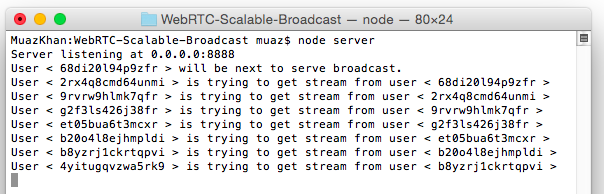
In the image, you can see that each NEW-peer is getting stream from most-recent peer instead of getting stream directly from the moderator.

npm install webrtc-scalable-broadcast

Now, goto node_modules>webrtc-scalable-broadcast:

cd node_modules
cd webrtc-scalable-broadcast

# and run the server.js file
node server.js

Or:

cd ./node_modules/webrtc-scalable-broadcast/
node ./server.js

Or install using WGet:

mkdir webrtc-scalable-broadcast && cd webrtc-scalable-broadcast
wget http://dl.webrtc-experiment.com/webrtc-scalable-broadcast.tar.gz
tar -zxvf webrtc-scalable-broadcast.tar.gz
ls -a
node server.js

Or directly download the TAR/archive on windows:

And now open: http://localhost:8888 or 127.0.0.1:8888.

If server.js fails to run:

# if fails,
lsof -n -i4TCP:8888 | grep LISTEN
kill process-ID

# and try again
node server.js

How it works?

Above image showing terminal logs explains it better.

For more details, to understand how this broadcasting technique works:

WebRTC Scalable Broadcast

Assuming peers 1-to-10:

First Peer:

Peer1 is the only peer that invokes getUserMedia. Rest of the peers will simply forward/relay remote stream.

peer1 captures user-media
peer1 starts the room

Second Peer:

peer2 joins the room
peer2 gets remote stream from peer1
peer2 opens a "parallel" broadcasting peer named as "peer2-broadcaster"

Third Peer:

peer3 joins the room
peer3 gets remote stream from peer2
peer3 opens a "parallel" broadcasting peer named as "peer3-broadcaster"

Fourth Peer:

peer4 joins the room
peer4 gets remote stream from peer3
peer4 opens a "parallel" broadcasting peer named as "peer4-broadcaster"

Fifth Peer:

peer5 joins the room
peer5 gets remote stream from peer4
peer5 opens a "parallel" broadcasting peer named as "peer5-broadcaster"

and 10th peer:

peer10 joins the room
peer10 gets remote stream from peer9
peer10 opens a "parallel" broadcasting peer named as "peer10-broadcaster"

Conclusion

  1. Peer9 gets remote stream from peer8
  2. Peer15 gets remote stream from peer14
  3. Peer50 gets remote stream from peer49

and so on.

License

Scalable WebRTC Broadcasting Demo is released under MIT licence . Copyright (c) Muaz Khan.

Wednesday, August 12, 2020

What is OSVR?

https://en.wikipedia.org/wiki/Open_Source_Virtual_Reality

https://osvr.github.io/


OSVR presentation at Boston VR meetup Jul 2015

OSVR Software Framework - Core - April 2015


 OSVR is an open-source software platform for virtual and augmented reality. It allows discovery, configuration and operation of hundreds of VR/AR devices and peripherals. OSVR supports multiple game engines, and operating systems and provides services such as asynchronous time warp and direct mode in support of low-latency rendering. OSVR software is provided free under Apache 2.0 license and is maintained by Sensics.


Looks like this was all starting in the 2016 VR Boom and Sensics founded in the late 1990’s for VR development looks like the website went down in the middle of 2019, Their domain was dead and now hijacked. Yuval Boger the CEO left Feb 2018.

https://www.reddit.com/r/OSVR/comments/bgby9y/what_happened_to_osvr_read_me_if_youre_new/

Sometime quite a while ago (early 2018 maybe?) I was informed in a personal email conversation with a Razer employee that Razer’s team was no longer focusing on OSVR, and instead had directed their efforts to supporting OpenXR.
More recently, I was directed to this tweet by former Sensics employee JeroMiya, which seems to indicate that Sensics, the other major OSVR partner, has dissolved.


What is OSVR?
OSVR or Open Source Virtual Reality is a software platform that allows different types of VR technologies to reside on the same ecosystem. This means end to end compatibility across different brands and devices, allowing you to use any OSVR supported HMDs, controllers and other technologies together, giving you the ability to customize the combination of hardware you’d like to use.

Think of OSVR as a software that allows you to customize your VR rig the same way you can customize your PC. When buying a PC it doesn’t matter what brand of monitor, printer, keyboard, graphics card or CPU you want to use – they all work together, allowing you to get a truly customized experience.

This is what OSVR is driving for the VR industry and to date it is the world’s most supported open VR ecosystem. It puts the power of choice in your hands.


NOLO Instructions: Use NOLO with OCULUS DK2 to play SteamVR
https://www.youtube.com/watch?v=qgL7NHixIX8

https://www.nolovr.com/ocdk2