Showing posts with label Embedded. Show all posts

Tuesday, December 15, 2020

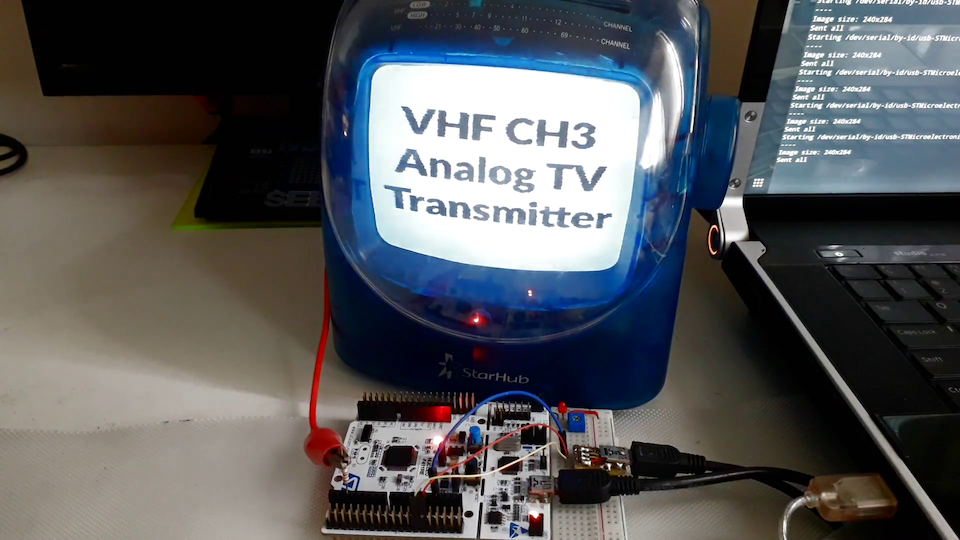
Transmit a video stream to a PAL analog TV using low-frequency PWM


Uses STM32F411 a slow 6.86MHz PWM output to generate modulated transmitting output and the 9th harmonic is 61.71MHz (it is picked up on channel 3 of the TV).

https://hackaday.io/project/171977-pal-streamer

https://github.com/zst123/PAL-Streamer


He used an AVR ATTiny85 to generate PWM waveforms which were picked up by his TV.

https://hackaday.io/project/4348-attiny85-does-ntsc-over-vhf

Wednesday, March 28, 2012

BeagleBone for embedded video and image processing. OpenCV, OpenNI


At over 1.5 billion Dhrystone operations per second and vector floating point arithmetic operations, the BeagleBone is capable of not just interfacing to all of your robotics motor drivers, location or pressure sensors and 2D or 3D cameras, but also running OpenCV, OpenNI and other image collection and analysis software to recognize the objects around your robot and the gestures you might make to control it. Through HDMI, VGA or LCD expansion boards, it is capable of decoding and displaying multiple video formats utilizing a completely open source software stack and synchronizing playback over Ethernet or USB with other BeagleBoards to create massive video walls. If what you are into is building 3D printers, then the BeagleBone has the extensive PWM capabilities, the on-chip Ethernet and the 3D rendering and manipulation capabilities all help you eliminate both your underpowered microcontroller-based controller board as well as that PC from your basement.


  • Board size: 3.4" x 2.1"
  • Shipped with 4 GB microSD card with the Angstrom Distribution with node.js and Cloud9 IDE
  • Single cable development environment with built-in FTDI-based serial/JTAG and on-board hub to give the same cable simultaneous access to a USB device port on the target processor
  • Industry standard 3.3V I/Os on the expansion headers with easy-to-use 0.1" spacing
  • On-chip Ethernet, not off of USB
  • 256MB of DDR2
  • 700-MHz super-scalar ARM Cortex™-A8
  • Easier to clone thanks to larger pitch on BGA devices (0.8mm vs. 0.4mm), no package-on-package memories, standard DDR2 vs. LPDDR, integrated USB PHYs and more.


https://www.adafruit.com/products/513  Current Retail price of $89

From the makers of the Beagle Board, we now have a smaller, lighter, but powerful single board linux computer, Beagle Bone! We like this move to a more compact and integrated SBC. For example, there is onboard Ethernet and USB host, as well as a USB client interface (a FTDI chip for shell access). It even comes preloaded with Angstrom Linux on the 4 GB microSD card!

Package includes:
  • Fully assembled and tested BeagleBone A5
  • Mini-B USB cable
  • 4 GB microSD card with preloaded Angstrom Linux
  • MicroSD to SD card adapter

NeTV - Open Source Hardware HDMI overlaying & video compositing

NeTV enables overlaying your web content on existing HDMI video feeds, such as those from a BluRay player or cable box.


Inside, it's an Angstrom linux box running Webkit that features chroma-key video compositing. Out of the box, the reference firmware enables the overlay of Facebook and Twitter feeds, and SMSes from Android phones. The UI is written in Javascript/HTML, making it easy and fast to develop your custom application.

The system also features a convenient HTTP API which uses POST commands to issue events to the screen and control device behavior. This, combined with zeroconf discoverability via Bonjour, makes integrating NeTV with other networked devices (such as your smartphone or laptop) a snap.

FPGA geeks take note! NeTV does video compositing with an FPGA. The FPGA is managed using a convenient set of built-in command-line tools. You can modify the NeTV's video processing capability using Xilinx's free Webkit development environment. Or, you can repurpose the FPGA for entirely new functionality.


$119 from   http://www.adafruit.com/products/609


Summary of development environment options for NeTV:
  • UI & application development in Javascript/HTML running on Webkit
  • Remote control using iOS/Android reference apps via HTTP API
  • Command line and kernel development via downloadable gcc environment, or via cloud-based "pre-built" Amazon EC2 environment.
  • Verilog/VHDL hardware development on FPGA via Xilinx Webpack tools
  • Solder-and-screws hardware development enabled via open source hardware stack


  • Board Size: 94mm x 57mm
  • 800 MHz Marvell PXA168 CPU (Marvell(R) Sheeva(TM) PJ-1 ARMv5TE-compliant with Intel WMMX2 extensions; 32kB/32kB L1 cache; 128kB L2 cache)
  • 128 MB DDR2 DRAM, 16-bits x 800MT/s
  • 1 GB microSD card pre-loaded with Angstrom-derived Linux distribution * User-accessible Xilinx Spartan-6 XC6SLX9 FPGA
  • HDMI input and output ports, compatible with pixclock speeds of 95MHz
  • Native resolution support for 480p, 576p, 720p, 1080p/24, 1080i/60
  • Video overlay on HDCP encrypted feeds
  • MicroUSB port for power and USB gadget support (attaches as ethernet device)
  • Embedded 802.11b/g wifi card
  • IR receiver
  • IR extender port
  • Pushbutton that triggers easy to use wifi-based firmware recovery mode
  • Blue and green status LEDs
  • Wifi configuration via IR remote and/or supporting Android app


Kit contains:
  • NeTV PCB board and IR remote
  • NeTV plastic enclosure kit: This is the plastic enclosure for an NeTV PCB. This lovely little box is made of two injection molded halves, a soft rubber anti-slip bottom, and a small baggie of screws. Assembly is simple and only takes a few minutes. Attach the NeTV using the short screws to the bottom plate. Remove the paper backing from the antenna and stick to the underside of the top piece, then fit the large top over it and snap in place. Screw in the 4 longer screws from the bottom. Finish by applying the rubber mat piece to the bottom to hide the screws. You're done!
  • 5V 1A USB power supply
  • MicroUSB cable
  • HDMI cable


NeTV is the first offering from the brand new Sutajio Ko-Usagi, the Open Source Hardware company led by "bunnie" Huang. bunnie is best known as the author of "Hacking the XBox" and was the lead hardware engineer of the chumby internet alarm clock. So, it is no surprise that his latest invention, conceived in chumby industries' Singapore office and brought to you by Sutajio Ko-Usagi, is a fully open source HDTV peripheral which brings WiFi Internet and Android mobile interfacing to any HDMI TV!

NeTV is available here in bare board form with an optional DIY plastics kit! This package does not have the enclosure fully assembled with the PCB, you will have to snap the NeTV into its case, a 5-10 minute task. This package contains the NeTV assembled and tested board, IR remote (to control the NeTV from your couch), a Micro-USB cable (to connect/power the NeTV), a 5V 1A USB power supply (to power the board), and an HDMI cable (to connect it to the HDTV)


Need more? Here's a video with an overview: http://kosagi.com/netv/netv_demo.html

See also
Chumby’s new NeTV makes almost ‘any TV’ into an Internet connected device
Tuesday, January 24, 2012

Raspberry Pi runs XBMC; reliably decodes 1080p - Hack-A-Day

Soon there will be less and less of an advantage to stand alone STB chip sets.

From Hack-A-Day


This is the Raspberry Pi board, an ARM based GNU-Linux computer. We’ve heard a little bit about it, but it recently garnered our attention when the machine was shown running XBMC at 1080p. That’s a lot of decoding to be done with the small package, and it’s taken care of at the hardware level.
Regular readers will know we’re fans of the XBMC project and have been looking for a small form factor that can be stuck on the back of a television. We had hoped it would be the BeagleBaord but that never really came to fruition. But this really looks like it has potential, and with a price tag of $35 (that’s for the larger 256MB RAM option) it’s a no-brainer.
Now there’s still a lot of rumors out there. We came across one thread that speculated the device will not decode video formats other than h.264 very well since it uses hardware decoding for that codec only. We’ll reserve judgement until there’s more reliable info. But you can dig through this forum thread where the XMBC dev who’s been working with the hardware is participating in the discussion.
Don’t forget to peek at the demo clip after the break too.


XBMC - Wikipedia, the free encyclopedia
en.wikipedia.org/wiki/XBMC
XBMC Media Center (formerly Xbox Media Center) is a free and open source cross-platform digital media hub and HTPC (Home theater PC) software

Saturday, September 10, 2011

Raspberry Pi Playing 1080p Video

http://www.raspberrypi.org/

From OS News:
Remember the Raspberry Pi ARM board we talked about last week? Well, while running Quake III is all fine and dandy and illustrates the board is capable of something, it didn't really tell me anything since I'd guess few people are going to use such a board for gaming. So, I was pleasantly surprised to see that the Raspberry Pi team posted another demo today - running 1080p video for eight hours straight. The chip was still cool to the touch. And just to reiterate: $25.

The Raspberry Pi board ran a 1080p video (H264) over HDMI for eight hours straight, and the board was still cool to the touch. Playback shows no hiccups, which is pretty impressive considering the price of this board. Furthermore, the HDMI port on the Raspberry Pi is a full implementation - so it carries audio signals as well (although audio was turned off for the demo since it took place on a trade show floor).


The Quake III demo was interesting and all, but this? Heck, this only further cements my desire to get a few of these. At this price, they could be excellent extremely small media centers, or even a tiny server. Sadly, little information is available at this point about which media player the team was using; they say it's a custom one, but I would personally want to see it running, I don't know, MPlayer or something. Of course, I'd love to see it run Boxee (my media center of choice) even more, but alas, I will have to find that out for myself once the board becomes available.
I want one of these today rather than tomorrow!