Showing posts with label remote control. Show all posts

Wednesday, February 01, 2012

Flexible web interface makes the universal remote nearly perfect

From Hack-A-Day:

[Fall Deaf] built an Arduino based universal remote control system. It uses a shield which has both an IR receiver and transmitter. This gives it the tools to learn codes from your existing remotes and play them back in order to control the devices. This functionality is really nothing new, but we think the user interface he developed for the system is absolutely fantastic!
Software is web-based. You can simply point a remote at the Arduino and push a button. The receiver will store the code which can later be assigned to a virtual button. The image above shows the channel-up option being created; it will be added to the list once confirmed. From there any web enabled device – smart phone, tablet, netbook, etc – can be used as the remote for the system. The only feature we think is missing is the ability to alter the layout of the buttons, with larger areas for the most frequently used commands.
After the break you can see a demonstration of this system, as well as the one extra feature we haven’t touched on yet. [Fall Deaf] included a Piezo element in the hardware design which lets him knock on his coffee table to use the remote if a smart-device isn’t close at hand.

Monday, September 12, 2011

Movea MoveTV platform delivers motion control options to TV and set-top makers

http://www.engadget.com/2011/09/09/movea-movetv-platform-delivers-motion-control-options-to-tv-and/

In case you've been living under a rock: motion controls are all the rage these days. And it's not just console makers who want in on the action. ASUS, Philips and Hillcrest Labs have all launched their own takes on the tech. Movea is a company that's well versed in the field, and now plans to start offering its wares direct to TV and set-top box manufacturers. The MoveTV platform offers not only remote control tech to OEMs, but opens up the company's tools to developers for building games and apps. Movea even announced its first partners: C&M Media, a major cable provider in Korea, and Remote Solution. Remote Solution will be licensing Movea's SmartMotion and integrating MoveTV into the set-tops provided to C&M. Soon enough using gestures to change channels and playing arm-flailing renditions of Angry Birds on your cable box could be the norm. Check out the video, PR and one more pic after the break. 


Monday, August 22, 2011

Roku licenses Hillcrest's motion-sensing technology

From Fiercecable:

Hillcrest Labs said Friday it struck a deal with Roku to license its Freespace motion-sensing remote control technology to the over-the-top video provider.

Roku is using Hillcrest's FreeSpace Motion Engine software in the remote control that comes with its new line of Roku 2 set-tops. The company is selling the receivers at prices ranging from $59.99 to $99.99.

While Hillcrest has been pitching cable MSOs its Loop Remote, which allows subscribers to navigate live TV, video-on-demand and DVR content by aiming an on-screen cursor, the company has had more success licensing its technology to consumer electronics manufacturers. Its customers include Universal Electronics, LG Electronics, Logitech, Eastman Kodak and Sony Computer Entertainment Inc.

Attributes of the Motion Sensing Remote: Freespace MotionEngine
Hillcrest Labs' patented Freespace technology is a complete solution for in-air pointing and motion control that can be added to a wide range of consumer devices including remote controls and game controllers for Smart TVs, streaming media players, Blu-ray players, set-top boxes, PCs, and tablets. Specific technical attributes of the Freespace MotionEngine include:
  • Advanced Motion Processing: The motion sensing remote translates natural hand movements into precise onscreen actions, which allows users to easily select icons and control objects, small and large, on the TV screen.
  • Orientation Compensation: Regardless of the orientation of the motion sensing remote in space (e.g. pointing at the ground, turned sideways, etc.), Freespace technology generates intuitive cursor movements and other on-screen actions. MEMS (Micro-Electro-Mechanical Systems) sensors combined with Hillcrest's proprietary software enable consistent control of the device from any position -- standing, sitting or reclining.
  • High Precision: Freespace technology can distinguish between intentional and unintentional movement, including natural hand tremors. This means the motion sensing remote's cursor does not shake or jiggle on screen like other motion-based controllers. The Freespace-enabled remote allows for single pixel precision with low latency to ensure the highest precision.
  • No Line-of-Sight Required: Freespace technology is based on inertial sensors which do not require line-of-sight to operate. This allows for a more relaxed usage model when compared to conventional infrared devices and motion-sensing devices that use cameras or optical sensors that require "line-of-sight" to operate. The combination of Bluetooth and Freespace technology gives users greater freedom to move around the house and comfortably use the remote control from any position.

Freespace technology is also the same technology used in Hillcrest's award-winning Loop pointer -- an in-air mouse designed for consumers who connect their computers to a television.


For more:
- see news release from Hillcrest

Related articles:
Report: Hulu blocks Hillcrest's Web browser
Hillcrest's Kylo browser brings Web content to TVs

Friday, August 05, 2011

Friday, July 29, 2011

Gesture Remote


The GestureRemote, designed by Lunar Europe and zinosign, lets you control your TV using gestures, much like a touchscreen phone.

"I’m surprised that it doesn’t also use an accelerometer to expand the vocabulary of possible gestures." - Martin Polley

The future is here: you can now surf through TV channels and digital media using simple gestures -- touch-free -- with no keypad in sight. The new Gesture Remote concept from IDENT Technology allows you to control all features of your TV without having to press a single button. www.ident-technology.com

I actually have some better ideas then this. If anyone is interested contact me, John Sokol

Friday, July 22, 2011

TV hacking via serial connection or IR codes

http://hackaday.com/2011/07/21/lg-tv-hacking-via-serial-connection-or-ir-codes

https://sites.google.com/site/brendanrobert/projects/lg-tv-hacks

LG LD450 HDTV, controlled over an RS232 Serial port.

LG used Linux and other FOSS when developing their TV's firmware.  Because of this, the majority of this firmware source code can be downloaded from their website: http://www.lg.com/global/support/opensource/opensource.jsp.  LG also documents some of the RS232 port functionality in the owner's manual: You can send remote control codes directly from your PC.

You can set values and read the values for the TV Internal Settings. Things like Volume and Brightness, On/Off etc.

Thursday, July 07, 2011

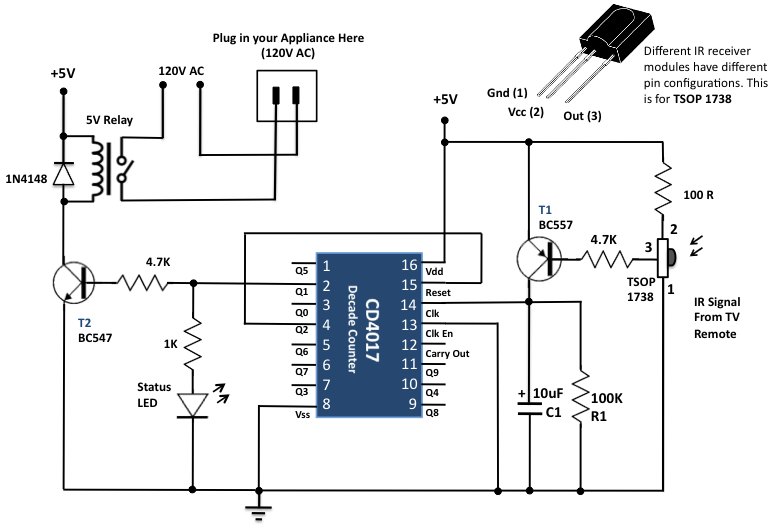
Infrared control for appliances

From Hack-A-Day Infrared control for appliances


[RB] at Embedded Lab sent in a great guide on how to control appliances with a remote control using a really clever implementation of a decade counter and IR receiver.
The build itself is very simple – just a relay connected to mains power and a handful of resistors and transistors. The device is controlled with a decade counter and an infrared module usually found tucked away in the bezel of a TV.
When everything is plugged in, the first pulse from the remote switches the relay on, providing power to the outlet. When a second pulse is received, the reset pin on the decade counter is activated, setting the device back to its original off state. It’s a pretty clever build, and could be built with parts lying around the bench.
The project is powered through wall power with the help of a transformer and a 7805 regulator, but we think the size could be reduced with a pass-through power enclosure – the circuit certainly is small enough. In all, a very nice, low component count build.

Friday, June 24, 2011

Micropointing - Technilogy

http://www.micropointing.com/technology.asp

Micropointing is a miniature pointing device, designed for use in handheld devices such as smartphones, navigating systems, and notebook PCs features technology uniting exceptionally small size with unprecedented user friendly control.
Micropointing’s “fingertip control area” is only one square millimeter.
  • Solves the challenge of added smart phone functionality while maintain ing small footprint, combined with superior usability and performance and an intuitive interface
  • Eliminates need for small fingers in operating cell phones and other devices and delivers robust durability with no moving parts, helping to reduce replacement parts costs
  • Offers improved functionality, high resolution, and exceptional sensitivity,