Showing posts with label Displays. Show all posts
Showing posts with label Displays. Show all posts
Monday, December 21, 2015
Matte vs Glossy Monitors
Matte vs Glossy Monitors
https://pcmonitors.info/articles/matte-vs-glossy-monitors/
Great discussion of Screen Surfaces and optical coatings.


Sunday, December 20, 2015
The Electrowetting Display
Electrowetting displays are just as capable as the liquid crystal displays in tablets and notebooks, but they are three times more efficient. Johan Feenstra, who heads Samsung's electronic display research center in the Netherlands, explains how they work.
http://spectrum.ieee.org/consumer-electronics/portable-devices/lighter-brighter-displays
Bright, full color e paper under development by Ricoh
This e-paper is currently under development by Ricoh.
It has a unique structure, with layers of a new electrochromic material that turn magenta, yellow, and cyan from their transparent state. In this way, Ricoh's e-paper enables a bright, full-color display, like ordinary paper, which hasn't been possible with e-paper until now.
This prototype is a 3.5-inch, QVGA display, with a pixel density of 113.6 ppi. Its reflectivity is 70%. Compared with current color-filter displays, this e-paper is 2.5 times brighter. It has a color reproduction range of 35%, higher than that of a newspaper, which is 31% in Japan.
"To produce colors, CMY subtractive mixing is ideal, and that's the model used in printing. We've implemented this by coating the panel with layers of yellow, magenta, and cyan. Ordinarily, if you try to use layers like this, you need an electrode driver for each layer. But in this display we're developing, the electrodes are active TFTs. So, we can achieve all colors with a single TFT, by switching the electrodes on the display side."
The material used for the chromic layers is transparent in its oxidized state, but becomes colored when it's reduced. To achieve a color display, rewriting is done three times in the order magenta, yellow, cyan. As the spaces between the electrochromic layers are narrow, at about 2 microns, the result is an ideal color-mixing display.
"The stage we're at right now is, we're checking that this model works with an actual active panel. Regarding the color drive, we haven't refined this yet, so switching takes over a second for each color. But the reaction speed of the chromic material is, ideally, about 100 ms."
"From now on, we'd like to increase the size to 6 inches, then 10 inches. We also want to work on achieving stable driving and faster response."
Sunday, June 08, 2014
Sony shows (and tells) us why 4K on a phone isn't crazy
http://www.engadget.com/2014/03/21/sony-xperia-z2-4k/
Looks like 4K cell phone cameras are here, but I have not found anyone making a cell phone 4K display yet.
This is something the VR world needs like the Oculus Rift and Samsung an other face mounted screens based HMD's.
Looks like 4K cell phone cameras are here, but I have not found anyone making a cell phone 4K display yet.
This is something the VR world needs like the Oculus Rift and Samsung an other face mounted screens based HMD's.
Friday, April 11, 2014
See The Human Cost Of Your iPhone… And It Will Shock You
http://sharepowered.com/see-the-human-cost-of-your-iphone-and-it-will-shock-you/#
When most people buy a new smartphone, they rarely think about where it came from — they only know it arrived perfectly in a new shiny white box. However, this is the secret that Apple and Samsung don’t want you to see.
Monday, March 31, 2014
Sony's 13-inch Digital Paper is the first device to use a flexible e-ink display
http://www.extremetech.com/computing/179386-sonys-13-inch-digital-paper-is-the-first-device-to-use-a-flexible-e-ink-display

After almost a year of agonizing posturing by Sony, the semi-flexible 13.3-inch Digital Paper has finally been unveiled. For $1100, you can get your hands on the thinnest, lightest A4-sized e-ink tablet. The Digital Paper supports stylus input, has built-in WiFi, and lasts up to three weeks on a single charge. The key technology here is the new Mobius display from E Ink, which is very light and highly flexible — though it isn’t clear how much of that flexibility made it into the final Digital Paper product.
When it comes to displays, the problem — as far as weight and flexibility are concerned — has always been the substrate. The liquid crystals, the organic diodes, the capsules of ink, the transistors, the wiring — all of the key display stuff is already light and flexible. But you have to build all of that stuff on something heat-resistant and transparent — i.e. glass. Glass is heavy (especially at larger sizes), and it’s very brittle (especially when it’s thin, which is necessitated by weight constraints). Glass is a terrible display substrate, basically, but sadly there hasn't been another option. Until now.
In the last few years, thanks to the development of new materials and low-temperature manufacturing techniques, it’s now possible to build displays with plastic substrates. These plastic displays are cheaper, lighter, and flexible (and thus more resistant to certain kinds of damage, too). Enter E Ink Mobius, which is basically the same e-ink tech as Pearl or Carta (found in various Kindles and other e-book readers), but on a flexible substrate. The E Ink website says that the Mobius display is 13.3 inches on the diagonal (i.e. the size of a piece of A4 or letter paper), with a resolution of 1600×1200 and the ability to show 16 levels of grayscale.

Sony’s Digital Paper, with stylus
When we first saw the technology back in May 2013, Sony helpfully had some of the Mobius displays outside of their chassis, so that you could marvel at their flexibility. Unfortunately, for the commercialized version of Digital Paper, there is once again a plastic bezel around the outside of the display. The Digital Paper website says nothing about flexibility, but in the video you can see some Digital Paper prototypes that appear to be at least semi-flexible, or not entirely rigid. In all likelihood, Digital Paper will probably flex a lot more than your iPad, and it will probably survive if you sit on it, or drop a book on it — but you can’t roll it up. That’s the next step, when we commercialize flexible batteries and circuitry.
At $1100 (shipping in May), Digital Paper is being pitched at education, business, and legal environments. Digital Paper appears to only support PDFs, but the website implies that software is included to convert Word, Excel, and PowerPoint files to PDF format. Stylus input appears to be accurate and high-resolution, though e-ink’s refresh latency might cause you some mental discomfort. 4GB of internal storage and a micro SD slot should give you plenty of space for annotating textbooks and documents. At just 357 grams (12.6 ounces), Digital Paper is by far the lightest large-screen tablet on the market, too (the iPad Air is a chunky 469 grams). Hopefully this is the beginning of an exciting, flexible-and-light-weight computing revolution!
Monday, September 09, 2013
So Real it's Scary
Comment from friend:
Ha! That's funny (and I think the comments are wrong about it being green screen - sure, you could do the same trick using green screen techniques and then making sure you use actual actors to fake reactions, but a strong sheet of about 1/4" thick clear acrylic overlaid on top of the flat screens would prevent any damage to the screens and still not spoil the effect). But, that said, my favorite elevator video is still that girl ghost in the elevator trick from Brazil.
Tuesday, September 03, 2013
EIZO DuraVision FDH3601 4K x 2K resolution across a 36.4" screen.
http://www.eizo.com/global/products/duravision/fdh3601/index.html


Monday, August 05, 2013
Hendy’s Law (pixels per dollar)

Pixels per dollar. Similarly, Barry Hendy of Kodak Australia has plotted the "pixels per dollar" as a basic measure of value for a digital camera, demonstrating the historical linearity (on a log scale) of this market and the opportunity to predict the future trend of digital camera price, LCD and LED screens and resolution.
Saturday, June 23, 2012
Thursday, June 07, 2012
Hack a Day - Where is my *%$#! virtual reality display?
http://hackaday.com/2012/06/07/where-is-my-ing-virtual-reality-display/
The video is well worth watching. John Carmack talks about latency issues in the display systems which is quite interesting and would effect anything interactive including regular gaming.
It's also one of the reasons I was driving the LCD display directly rather the going through a higher level input like VGA or VGA conversion to NTSC then to the LCD each step adds buffering and latency.

The video is well worth watching. John Carmack talks about latency issues in the display systems which is quite interesting and would effect anything interactive including regular gaming.
It's also one of the reasons I was driving the LCD display directly rather the going through a higher level input like VGA or VGA conversion to NTSC then to the LCD each step adds buffering and latency.
For years I’ve been asking, loudly and frequently, where’s my F*&#$%ing virtual reality? I realize that many of us, depending on what influenced our dreams of VR will have different definitions, so let me elaborate. When I was a kid, I played Dactyl Nightmare at the Union station in St. Louis. You stepped inside this “stage”, donned a massive clunky headache inducing HMD, and brandished a floating joystick of doom to challenge other players and a flying Pterodactyl. I was awe struck. My 12 year old brain decided that this was the future.
Fast forward 20 years and the thought of VR is relegated to niche builds in peoples homes. Graphics hardware has progressed considerably, with games that look absolutely breathtaking becoming the norm. When you sit down to play an FPS style game at a PC and move the mouse around, it seems that it would only be a tiny step to replace that with some nice head tracking. I’ve actually seen people just tape gyro mice to their head to achieve their goal. I’ve seen people strap entire monitors to their head too! I’ve always wondered why there isn’t a better commercial solution though. Are there really so few of us that want this?
Now, with 3d movies seeming to take hold, and 3d televisions appearing in peoples homes, I am reminded again of the grandeur that a proper hmd could supply. My brother has a 3d television and tossed in some boxing game for the PS3 that is 3d. It was amusing, but not really immersive. Don’t get me started on the inaccuracy of those stupid motion controllers I had to use either. The Kinect is a big move forward in terms of how to track body movements, I’ve seen that added to the mix in peoples homes as well. Frankly, I’d settle for a decent HMD.
As it turns out, [John Carmack] is also on the quest for VR. He was at E3, talking about a new headset kit being built by PalmerTech called Oculus Rift that blows anything else out there away in terms of resolution, response, and cost. This kit will be DIY style and supposedly cost around $500, though you still have to add tracking. The kit looks pretty cool, but what is cooler is that he describes what is really holding most progress back. Apparently, it is the latency involved with the entire loop of motion->computer->display.
Are you listening to this [Jeri Ellsworth]? You paying attention [Jeff Keyser]? Valve needs to make me an HMD, even if I’m the only one on the planet that will enjoy it. Just think of it as a hat.
Monday, June 04, 2012
Corning reveals astounding roll-up Willow glass for flexible displays
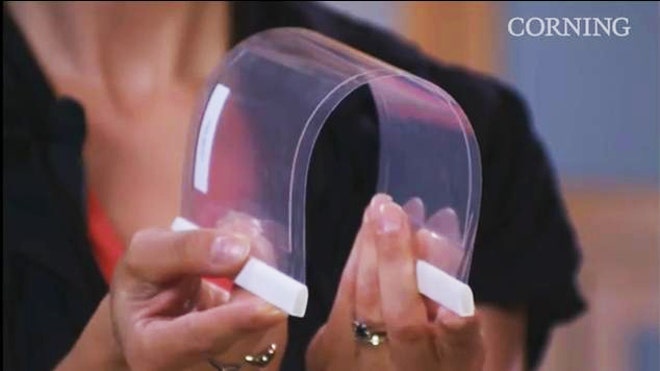
Read more: http://www.foxnews.com/scitech/2012/06/04/corning-reveals-astounding-roll-up-willow-glass-for-flexible-displays/#ixzz1wqb57AOO
Glass as thin and as flexible as a sheet of paper that can be printed on rolls just like a newspaper will be available to phone makers as soon as this month, said Dipak Chowdhury, head of Corning’s ultra-flexible thin-glass project Willow.
“It’s seriously built like paper,” Chowdhury told FoxNews.com, “and behaves just like that.”
'Picture glass as thin as copy paper -- and it behaves just like that.'
- Dipak Chowdhury, program director for flexible glass at Corning
Corning unveiled the new Willow Glass Mon., June 5; Chowdhury will deliver a presentation on the technology at the Society for Information Display’s Display Week 2012 conference in Boston.
Ordinary displays in notebooks or smartphones are made of glass sandwiches, usually three sheets of the stuff measuring a bare 0.7 or 0.5 millimeters in thickness. At 0.1 millimeters thin, Corning’s brand new Willow glass is as thin as the finest human hair -- and will makes those smartphone sandwiches as much as 7 times thinner.
Glass isn’t inherently a rigid substance, Chowdhury explained. When it gets superthin, it becomes flexible just like any substance.
“If you take glass as thick as a business card, it’s not flexible. Think about the same business card and make it seven times thinner -- it works like paper,” he said. Likewise, a phone book is solid, but the individually pages in it are easily rolled.
“Can you roll a ream of paper? And those pages aren’t even attached to each other,” explained Alfred Poor, founder of the HDTV Almanac and a long-time monitor industry insider.
“The Holy Grail has been to get to roll to roll manufacturing for displays,” he told FoxNews.com.
Willow Glass won’t immediately lead to roll-up iPhones, Poor was quick to note. The entire display industry is built for inflexible sheets of glass, made in massive, astronomically expensive plants.
“It costs billions of dollars to build an LCD plant these days,” Poor said.
But several of the layers in those smartphone sandwiches could immediately be replaced with Willow Glass, meaning your next iPhone or Galaxy or Nexus or whatever could be lighter, thinner, and potentially cheaper.
Why are there several layers? Only the top surface is protective. The interior layers are coated with electronics or other elements to make the display work.
Think of a potato chip bag, Poor explained. Such bags are made of plastic and printed with both a protective metal foil layer and a colorful logo on a roll to roll process. Likewise, several layers in a display are printed on.
“But instead of printing logos, they print a backplane, made of silicon,” Poor said.
Indeed, Chowdhury said that the company has been working with suppliers and research labs to develop new processes for printing, cutting and handling the immense wrapping-paper-like rolls of glass.
Display giant Dai Nippon Printing Co (DNP) will demonstrate touch sensors and color filters -- two essential components for modern smartphones -- printed onto Willow Glass, Chowdhury said.
“It was a technical hurdle, but we conquered this hurdle,” he told FoxNews.com.
DNP currently supports roll to roll printing on ultra thin plastic, similar to those potato chip bags. Alexia Allina with Frito-Lay told FoxNews.com the average bag is about 0.06 millimeters thin. But plastic is far from ideal for smartphones, Poor said.
“Plastic substrates are flexible but lack a lot of the qualities you need: They tend not to be smooth enough, for one thing. One of the advantages of glass is it can be microscopically smooth,” he told FoxNews.com.
Any roughness can cause defects in the display, he said. Plastic is also permeable, notably to water -- a huge problem for some types of display.
Friday, April 27, 2012
Gigantic liquid crystal display is like a giant calculator
Some say he turns on his soldering iron by saying, “Flame on!.” He
deadbug solders – QFP packages. All we know is he’s called [stig] and he
sent in an awesome an awesome video of
a new display at the Nature Research Center in Raleigh, North Carolina.
It’s a 10 foot by 90 foot LCD display that uses 6 inch square glass
panels containing the same liquid crystals you’d find in a calculator.
The display/installation is called Patterned by Nature and is built using 3600 pieces of LCD privacy glass. When a voltage is applied to the glass it changes from clear to opaque. While this technology has been around for decades (just look at your calculator), only in the last few years has LCD privacy glass come down in price to make a project like this economical.
The gigantic display was created in part by Sosolimited, an art studio who has made a similar project before. The display hanging in the atrium of the Raleigh Nature Research Center is amazingly efficient for its size drawing only 75 watts.
If you’d like to try your hand at a similar build, we wish you luck; this LCD glass is still somewhat expensive but perhaps in a few years the price will come down enough that we can play Tetris on the side of a building.
The display/installation is called Patterned by Nature and is built using 3600 pieces of LCD privacy glass. When a voltage is applied to the glass it changes from clear to opaque. While this technology has been around for decades (just look at your calculator), only in the last few years has LCD privacy glass come down in price to make a project like this economical.
The gigantic display was created in part by Sosolimited, an art studio who has made a similar project before. The display hanging in the atrium of the Raleigh Nature Research Center is amazingly efficient for its size drawing only 75 watts.
If you’d like to try your hand at a similar build, we wish you luck; this LCD glass is still somewhat expensive but perhaps in a few years the price will come down enough that we can play Tetris on the side of a building.
Friday, April 06, 2012
Stolen Samsung AMOLED Display Technology
Wow, I look forward to reading about the details. It's like out of some novel.
11 Arrested for Stealing, Selling Samsung Display Technology
http://www.wired.com/gadgetlab/2012/04/11-arrested-for-stealing-selling-samsung-display-technology
Stolen Samsung AMOLED technology sold to rival, 11 suspects arrested
http://www.bgr.com/2012/04/05/stolen-samsung-amoled-technology-sold-to-rival-11-suspects-arrested/
11 Arrested for Stealing, Selling Samsung Display Technology
http://www.wired.com/gadgetlab/2012/04/11-arrested-for-stealing-selling-samsung-display-technology
Stolen Samsung AMOLED technology sold to rival, 11 suspects arrested
http://www.bgr.com/2012/04/05/stolen-samsung-amoled-technology-sold-to-rival-11-suspects-arrested/
Friday, January 20, 2012
Tubular POV display
http://hackaday.com/2012/01/20/tubular-pov-display

[Ryan]‘s cylinder POV display is an amazing piece of work. Right now it’s impressive sitting on his workbench, but we’re sure it would be astonishing hanging above the middle of a dance floor. There are 64 RGB LEDs on this display and they’re certainly bright enough to liven up any space.
Power is provided through a slip ring. The ground is connected to the shaft of the motor [Ryan] picked up at an auto parts store. It’s an efficient way to do things, but the display can only be controlled by whatever image is stored in the ATMega1284′s flash memory. [Ryan] admits this isn’t an ideal setup so he’s working on a ZigBee or Bluetooth connection.
We’ve seen some amazing spinny POV cylinders, but [Ryan]‘s build looks amazingly professional. All the board files, schematics and code are uploaded, as well as an image converter for BMPs and PNGs. Check out the demo after the break.
Wednesday, January 18, 2012
Laser Phosphor Display, or LPD
http://www.prysm.com/technology/overview/
LPD uses a laser engine and a phosphor panel to create stunning, lifesize images with low-power, solid-state lasers. Fundamentally different than LED- and LCD-based technologies, LPD solutions—packaged configurations containing LPD technology and other components—are designed to a human scale and offer brilliant image quality, unmatched viewing angles, and the industry’s smallest environmental footprint. Compared to other digital technologies,


LPD uses a laser engine and a phosphor panel to create stunning, lifesize images with low-power, solid-state lasers. Fundamentally different than LED- and LCD-based technologies, LPD solutions—packaged configurations containing LPD technology and other components—are designed to a human scale and offer brilliant image quality, unmatched viewing angles, and the industry’s smallest environmental footprint. Compared to other digital technologies,
Monday, January 16, 2012
Pixel Qi Screens are for Laptops and Tablets, Not Just OLPC (Video)
From Slashdot:
Pixel Qi Screens are for Laptops and Tablets, Not Just OLPC (Video)
Monday, December 26, 2011
Sharp Demos World’s First 85-inch 8K4K Display
From Tom's Guide:
Sharp is sporting an 85-inch 8K4K display at IFA 2011, but don't expect market saturation until after 2020.

Sharp is sporting an 85-inch 8K4K display at IFA 2011, but don't expect market saturation until after 2020.
Now that 1080p HDTVs are saturating the market at a comfortable level (financially), what's next for the general consumer? Graphics so sharp and life-like that eyes will melt and brains will suddenly ignite into flames? No, try jacking up the resolution to 7680 x 4320 (33 million color dots), or 8K4K, like Sharp has done with an 85-inch display it's currently showcasing at IFA 2011 in Berlin.
While many home theater junkies my simply drop in giddy delight at the sight of such a monstrous display, Sharp points out in the video below that currently there's no content to support an 8K4K display. As it stands now, Sharp had to use a special camera in order to capture compatible footage, and supposedly a special "recorder" to store the footage and pipe it to the display. Unfortunately, Sharp wouldn’t specify the actual size of the stored video files -- we can only imagine.
Trusted Reviews, which got an up-close-and-personal view of the 8K4K screen, had this to say about the viewing experience:
"The quality of the native 8k4k material on Sharp's screen almost defies description. You could see levels of detail in people's faces, the ground, the tree, or actually any part of the image that the event being shown felt so tangible you felt you could just step forward and join the madness. Never before, in other words, has the idea of HDTV giving you a 'window on the world' been so accurately realized."
So when will consumers begin to see 8K4K HDTVs roll out to retail shelves? Given that the market is still living in a 1080p world, it may be a long, long time. Various reports indicate that experimental broadcasting on 8K4K content won't even begin until 2020.
Sharp 8K4K TV, 7680x4320 resolution, 85", the future of HDTV
Monday, December 19, 2011
Fwd: Next-Gen IPods Are Curved Screen Bracelets, Report Suggests | Fox News
---------- Forwarded message ----------
From: Jesse Monroy
Date: Mon, Dec 19, 2011 at 1:02 PM
Subject: Next-Gen IPods Are Curved Screen Bracelets, Report Suggests | Fox News
http://www.foxnews.com/scitech/2011/12/19/next-gen-ipods-are-curved-screen-bracelets-report-suggests/
From: Jesse Monroy
Date: Mon, Dec 19, 2011 at 1:02 PM
Subject: Next-Gen IPods Are Curved Screen Bracelets, Report Suggests | Fox News
http://www.foxnews.com/scitech/2011/12/19/next-gen-ipods-are-curved-screen-bracelets-report-suggests/
Apple may be secretly developing wearable iPods that offer full support for voice commands using the company’s Siri software. Details surrounding the supposed project were revealed by The New York Times on Monday.
Apple is reportedly working on a “curved-glass iPod that would wrap around the wrist,” which sounds similar to a watch-like device that could replace the iPod nano and shuffle in gyms around the world. Presuming Siri support would be the same as it is on the iPhone 4S, users could command the device to play a specific song, check the weather or more.
We’re even imagining deeper Siri integration where a user might be able to ask their iPod how far they have run or what their current heart rate is. Read on for more.
The New York Times also suggested that Apple’s small group of engineers working on the project have considered using the iPhone as the central information hub. So, for example, your iPhone might do all of the hard processing work while the wearable iPod is simply a means to display what you need.
Google may be working on a similar project in its Google X labs, although less information is known about it. Google is said to have already hired engineers from Apple, Nokia Labs and universities to begin development on wearable products.
Friday, December 09, 2011
PenTile displays.
http://en.wikipedia.org/wiki/PenTile_matrix_family
From Hack a day
Simulating PenTile RGBG displays

Here.s an interesting experiment that lets you simulate PenTile displays on a normal LCD monitor. [Barrett Blackwood] wanted to test out how some graphics look on PenTile RGBG displays with different pixel densities. These PenTile RGBG matrices are sometimes used in OLED displays. For instance, the Nexus One smart phone features a display of this type. Because red, green, and blue OLEDs emit different intensities of light, the pixels are laid out differently from LCD panels in order to balance the color mixing. Our eyes see the green light very well, and so green sub-pixels are made much smaller than their red and blue counterparts.Because the hardware layout is different, some graphics appear to have crosshatching artifacts in them when viewed on the PenTile displays. [Barrett] made the example above to simulate how graphics look on a traditional LCD screen (image on the left), and how they appear on the PenTile scren (image on the right). The magenta hue seen above is a result of resizing the image. Since the simulation method turns off 1/3 of the green pixels in the image, resizing it ruins the careful calculation. It must be view at a 1:1 ratio to see the image correctly, at which point the magenta magically disappears.
From Hack a day
Simulating PenTile RGBG displays
Here.s an interesting experiment that lets you simulate PenTile displays on a normal LCD monitor. [Barrett Blackwood] wanted to test out how some graphics look on PenTile RGBG displays with different pixel densities. These PenTile RGBG matrices are sometimes used in OLED displays. For instance, the Nexus One smart phone features a display of this type. Because red, green, and blue OLEDs emit different intensities of light, the pixels are laid out differently from LCD panels in order to balance the color mixing. Our eyes see the green light very well, and so green sub-pixels are made much smaller than their red and blue counterparts.
Subscribe to:
Posts (Atom)
