Saturday, April 16, 2022

Scalable WebRTC peer-to-peer broadcasting

 https://github.com/muaz-khan/WebRTC-Scalable-Broadcast


WebRTC Scalable Broadcast

Scalable WebRTC peer-to-peer broadcasting demo.

npm downloads

This module simply initializes socket.io and configures it in a way that single broadcast can be relayed over unlimited users without any bandwidth/CPU usage issues. Everything happens peer-to-peer!

RTCMultiConnection v3 and Scalable Broadcast

RTCMultiConnection v3 now naively supports scalable-broadcast:

DemoTitleTestLiveViewSource
Scalable Audio/Video BroadcastDemoSource
Scalable Screen BroadcastDemoSource
Scalable Video BroadcastDemoSource
Scalable File SharingDemoSource

Demos

Note: These (below) are old demos. Above (RTCMultiConnection-v3) demos are preferred (and up-to-dated).

  1. index.html - share video or screen or audio over unlimited users using p2p methods.
  2. share-files.html - share files with unlimited users using p2p methods!

Browsers Support:

BrowserSupport
FirefoxStable / Aurora / Nightly
Google ChromeStable / Canary / Beta / Dev

Browsers Comparison

host means the browser that is used to forward remote-stream.

HostStreamsReceiversIssues
ChromeAudio+VideoChrome,FirefoxRemote audio tracks are skipped.
ChromeAudioNoneChrome can NOT forward remote-audio
ChromeVideoChrome,FirefoxNo issues
ChromeScreenChrome,FirefoxNo issues
FirefoxAudio+VideoChrome,FirefoxNo issues
FirefoxAudio+ScreenChrome,FirefoxNo issues
FirefoxAudioChrome,FirefoxNo issues
FirefoxVideoChrome,FirefoxNo issues
FirefoxScreenChrome,FirefoxNo issues
  1. First column shows browser name
  2. Second column shows type of remote-stream forwarded
  3. Third column shows browsers that can receive the remote forwarded stream
  4. Fourth column shows sender's i.e. host's issues

Chrome-to-Firefox interoperability also works!

Android devices are NOT tested yet. Opera is also NOT tested yet (though Opera uses same chromium code-base).

Currently you can't share audio in Chrome out of this big. In case of audio+video stream, chrome will skip remote-audio tracks forwarding. However chrome will keep receiving remote-audio from Firefox!

Firefox

Firefox additionally allows remote-stream-forwarding for:

  1. Streams captured from <canvas>
  2. Streams captured from <video>
  3. Streams captured or generated by AudioContext i.e. WebAudio API

Is stream keeps quality?

Obviously "nope". It will have minor side-effects (e.g. latency in milliseconds/etc.).

If you'll be testing across tabs on the same system, then you'll obviously notice quality lost; however it will NOT happen if you test across different systems.
WebRTC Scalable Broadcast

In the image, you can see that each NEW-peer is getting stream from most-recent peer instead of getting stream directly from the moderator.

npm install webrtc-scalable-broadcast

Now, goto node_modules>webrtc-scalable-broadcast:

cd node_modules
cd webrtc-scalable-broadcast

# and run the server.js file
node server.js

Or:

cd ./node_modules/webrtc-scalable-broadcast/
node ./server.js

Or install using WGet:

mkdir webrtc-scalable-broadcast && cd webrtc-scalable-broadcast
wget http://dl.webrtc-experiment.com/webrtc-scalable-broadcast.tar.gz
tar -zxvf webrtc-scalable-broadcast.tar.gz
ls -a
node server.js

Or directly download the TAR/archive on windows:

And now open: http://localhost:8888 or 127.0.0.1:8888.

If server.js fails to run:

# if fails,
lsof -n -i4TCP:8888 | grep LISTEN
kill process-ID

# and try again
node server.js

How it works?

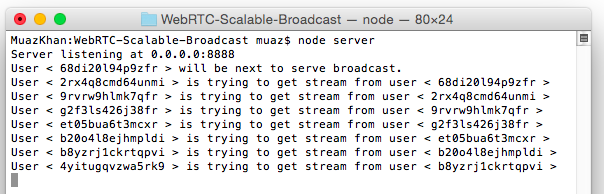
Above image showing terminal logs explains it better.

For more details, to understand how this broadcasting technique works:

WebRTC Scalable Broadcast

Assuming peers 1-to-10:

First Peer:

Peer1 is the only peer that invokes getUserMedia. Rest of the peers will simply forward/relay remote stream.

peer1 captures user-media
peer1 starts the room

Second Peer:

peer2 joins the room
peer2 gets remote stream from peer1
peer2 opens a "parallel" broadcasting peer named as "peer2-broadcaster"

Third Peer:

peer3 joins the room
peer3 gets remote stream from peer2
peer3 opens a "parallel" broadcasting peer named as "peer3-broadcaster"

Fourth Peer:

peer4 joins the room
peer4 gets remote stream from peer3
peer4 opens a "parallel" broadcasting peer named as "peer4-broadcaster"

Fifth Peer:

peer5 joins the room
peer5 gets remote stream from peer4
peer5 opens a "parallel" broadcasting peer named as "peer5-broadcaster"

and 10th peer:

peer10 joins the room
peer10 gets remote stream from peer9
peer10 opens a "parallel" broadcasting peer named as "peer10-broadcaster"

Conclusion

  1. Peer9 gets remote stream from peer8
  2. Peer15 gets remote stream from peer14
  3. Peer50 gets remote stream from peer49

and so on.

License

Scalable WebRTC Broadcasting Demo is released under MIT licence . Copyright (c) Muaz Khan.

Friday, March 11, 2022

Scanning laser microscope


3D printed, scanning laser confocal microscope so I could collect 3D surface topology and profilometry data! The microscope stage is based on an OpenFlexure "Delta" stage, and the confocal optics are constructed with a 3D printed body, some lenses, a 405nm laser, pinhole and photodiode. The microscope is controlled by a Raspberry Pi (which controls an arduino to move the steppers). It's not beautiful, it takes forever to scan, and the images are of dubious quality... but it works! OpenFlexure: https://openflexure.org/ 0:00 Intro 1:56 Confocal vs Widefield Microscopy 3:25 OpenFlexure Motion Platform 4:01 Confocal optical breakdown 8:00 Delta motion stage 8:43 Photodiode amplifier 9:14 Confocal Pinhole demonstration 10:31 Camera vs Photodiode 11:31 Data processing considerations 14:05 Images and results! 18:22 Optimizations 21:37 Discord! Come hang out with us!

Thursday, March 10, 2022

ASCII Video (Coding Challenge 166)


Let's make ASCII art in p5.js together! In this video, I demonstrate a variety of techniques for translating the pixels of an image into text and finish with rendering video as text ASCII characters in a DOM. https://thecodingtrain.com/CodingChal... p5.js Web Editor Sketches: 🕹️ ASCII video: https://editor.p5js.org/codingtrain/s... 🕹️ ASCII image canvas: https://editor.p5js.org/codingtrain/s... 🕹️ ASCII image dom: https://editor.p5js.org/codingtrain/s... 🕹️ ASCII text: https://editor.p5js.org/codingtrain/s... 🕹️ ASCII weather api: https://editor.p5js.org/codingtrain/s... 🎥 Previous video: https://youtu.be/PbPUgyql5p4?list=PLR... 🎥 All videos: https://www.youtube.com/playlist?list... Links discussed in this video: 🔗 ASCII play by ertdfgcvb: https://play.ertdfgcvb.xyz/ 🔗 HTML Entity: https://developer.mozilla.org/en-US/d... 🔗 HTML div: https://developer.mozilla.org/en-US/d... 🔗 p5.js loadPixels(): https://p5js.org/reference/#/p5/loadP... 🔗 p5.js brightness(): https://p5js.org/reference/#/p5/brigh... 🔗 CodingTrainChooChoo on Twitch: https://www.twitch.tv/codingtrainchoo... Other videos mentioned in this video: 🎥 The Pixel Array: https://youtu.be/nMUMZ5YRxHI 🎥 Basics of CSS: https://youtu.be/zGL8q8iQSQw 🎥 p5.js Web Editor - Uploading Media Files: https://youtu.be/rO6M5hj0V-o Timestamps: 0:00 Welcome! Choo choo! 0:28 Introducing Today’s Topic 1:39 Pixel to ASCII 4:52 Pixelating an image 7:03 Pixel Array Explanation 8:40 Back to the code 10:18 Adding Text 11:04 Mapping Brightness to Characters 13:26 Switching from canvas to DOM 18:10 Real-time ASCII video 20:10 Some refinemens 21:29 See you next time! 🚂 Website: http://thecodingtrain.com/

Thursday, September 30, 2021

Looking Glass Portrait - 3D holographic display


They are now $300 with very expensive high end 4K and 8K versions now available. 

USING A LASER TO BLAST AWAY A BAYER ARRAY


A Bayer array, or Bayer filter, is what lets a digital camera take color photos. It’s an array of tiny color filters that sit on top of a camera’s CCD. The filter makes it so that each sub-pixel in the image sensor only sees red, green, or blue light. The Bayer filter is an elegant tool that gives us color digital photos, but what would you do if you wanted to remove one?

[Les Wright] has devised a way to remove the Bayer filter from the Raspberry Pi Camera. Along with filtering red, green, and blue light for their respective sensors, Bayer filters also greatly reduce the amount of UV and IR light that make it to the CCD sensor. [Les] uses the Raspberry Pi camera in his Pi-based Spectrometer, and he wants to remove the Bayer filter to improve and expand its sensitivity.

Of course, [Les] isn’t the first one to want to do this. Some have succeeded in physically scratching the filter off of the CCD, but because the Pi Camera has vital circuitry around the outside of the sensor, scratching the filter off would likely destroy the circuitry. Others have stripped it off using chemical means, so [Les] gave this a go and destroyed no small number of cameras in his attempt to strip the filter off with solvents like DMSO, brake fluid, and industrial paint stripper.

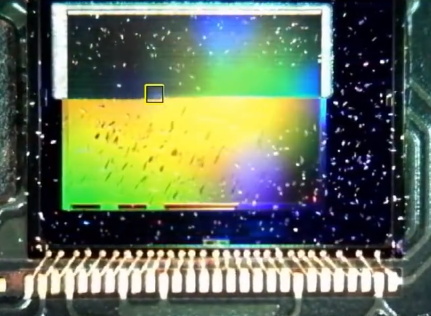
A look at the CCD, halfway through the process.

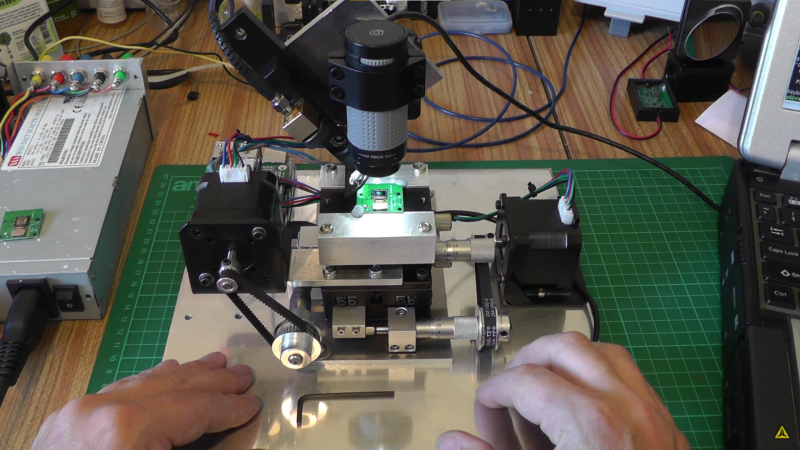
Inspired by techniques used in industry, [Les] eventually tried to use a several-kW nitrogen laser to burn off the filter (which seems appropriate given his experience with lasers). He built a rig that raster scans the laser across the sensor using stepper motors to drive micrometer bases. A USB microscope was included to allow progress to be monitored, and you can see a change in the sensor’s appearance as the filter is removed.

After blasting off the Bayer filter, [Les] plugged his improved camera into his home-built spectrometer and pointed it outside. The new camera gives the spectrometer much more uniform sensitivity and allows [Les] to see further into the IR and UV bands. The spectrometer can even detect the Fraunhofer lines—subtle dips in the sun’s spectrum from absorption by molecules in the atmosphere.

This is incredible for a DIY setup and instrument, and we can’t wait to see what [Les] does next to improve his measurements. If your spectrometry needs are more mass than visual, take a look at this home-built mass spectrometer. Home spectrometers aren’t just for examining light spectra—they can also be used to judge the ripeness of fruit!


 https://hackaday.com/2021/08/09/using-a-laser-to-blast-away-a-bayer-array/

Sunday, August 22, 2021

The Basics of SMPTE ST 2110 in 60 Minutes - Wes Simpson


A one-hour tutorial on the basic principles of SMPTE ST 2110, including all of the published parts of the standard and a peek at some of the new ones in the works. Presented by Wes Simpson, President, Telecom Product Consulting (telecompro.tv) during the NAB show in Las Vegas in April, 2019.

What can you do with MPA1000? The IPMX SoM from Macnica


Deeper dive into what you can do with MPA1000 and it's web interface. https://macnicatech.com/mpa-1000/