Tuesday, April 25, 2023


Sunday, March 19, 2023
Thursday, March 02, 2023
Chrome Multicast Receive API
Source: https://chromestatus.com/feature/5683808135282688
Subscribes to source-specific multicast IP channels and receives the UDP payloads for that traffic in web applications. This allows web developers to use network and server resources much more efficiently wherever multiple receivers are located inside networks that forward and replicate multicast traffic, whenever transmitting popular data (anything where the same content has to be delivered to many different end users).
Motivation
Currently, Web application developers have no API for receiving multicast traffic from the network. All traffic for web applications thus requires a one-to-one connection with a remote device. Multicast IP provides a one-to-many data stream, and enables packet replication by the network, enabling efficient use of broadcast-capable physical media and reducing load on congested shared paths. Enabling Web applications to receive multicast would solve the receiver distribution problem that contributes to the current under-utilization of multicast on the internet. This effort is coupled with a standardization effort in the MBONED working group at IETF and ongoing trials with multiple network operators to deploy a standardized approach for ISPs to ingest externally sourced multicast UDP traffic.
Status in Chromium
Multicast to the Browser
https://datatracker.ietf.org/meeting/106/materials/slides-106-mboned-multicast-to-the-browser-00
Wednesday, March 01, 2023
Livepeer (LPT): Decentralized Video Transcoding Services
https://livepeer.org/primer
Livepeer is an Ethereum-based protocol that distributes video transcoding work throughout its decentralized network. The protocol aims to provide cost efficient, secure, and reliable infrastructure that can handle today's high demand for video streaming.
Livepeer is a scalable Platform-as-a-Service (PaaS) for startups and organizations looking to add live or on-demand video to their offerings. At its core, Liverpeer is an Ethereum-based protocol for video transcoding, which refers to the reformatting of a video to suit a variety of bandwidths and devices. Designed to make streaming more reliable while reducing costs, Livepeer acts as a decentralized marketplace for developers building applications that integrate live video and transcoding providers. The network’s native token is the Livepeer Token (LPT).
At its core, Livepeer seeks to offer a scalable and cost-effective infrastructure solution that can meet today’s demand for streaming. Beyond accounting for 80% of internet bandwidth consumption, video streaming is also extremely costly on the computing side, largely because video distributors must first transcode video before broadcasting it. The resulting costs have meant that many video streaming companies have resorted to selling user data and subjecting users to ads to earn revenue to pay their infrastructure bills. Livepeer seeks to offer a decentralized, token-incentivized, and open network to replace this model — and claims that it can reduce costs up to 50x compared to legacy methods.
How Does Livepeer Work?
First, nodes called Broadcasters send video streams to the network for transcoding. These streams are received by Orchestrators — users who contribute their computer’s CPU, GPU, and bandwidth to the network in exchange for fees denominated in ether (ETH) charged to Broadcasters. To become an Orchestrator, you must know how to stake Livepeer. As an Orchestrator, your LPT stake could be slashed if you behave maliciously or suboptimally.
Orchestrators serve as coordinators, being responsible for ensuring that video is correctly transcoded. They send the video to Transcoder hardware that encodes and reformats the video before sending it back to Orchestrators. Work is distributed to Orchestrators in proportion to the amount of LPT they have staked. The Transcoders that perform the work are often GPUs which are mining digital currencies, but also happen to have video encoding ASICs sitting idle during the mining process. Livepeer enables these ASICs to be put to use, driving additional revenue for the operators, all without disrupting their mining operations.
If you are a LPT holder but do not wish to participate as an Orchestrator or Transcoder, you can stake your LPT tokens with an Orchestrator in exchange for a portion of the Orchestrator’s earned rewards and fees.
Consensus on Livepeer
Livepeer utilizes a two-layer consensus mechanism. First, the Livepeer ledger and its transactions are recorded on and secured by the Ethereum blockchain. The second consensus layer handles the distribution of newly generated LPT and verifies that transcoding work has been done correctly. This layer utilizes a Delegated Proof-of-Stake (DPoS) model in which Orchestrators act as validators — nodes that participate in the protocol to ensure proper payment settlement, token distribution, and security. When one Orchestrator performs transcoding work, Broadcast nodes can self-validate or outsource to other Orchestrators to check for mistakes and malicious behavior. This is a costly operation, so Livepeer only randomly verifies a small percentage of the work done.
The Livepeer Token (LPT)
LPT is designed to act as a coordination and incentive mechanism that helps keep the network as cost-effective, reliable, and secure as possible. It serves as a bonding mechanism to financially incentivize Orchestrators to act honestly, thus securing the network.
New Livepeer tokens are minted at the conclusion of periods known as ‘rounds,’ and are distributed to Delegators and Orchestrators in proportion to their stakes. This is intended to give those who participate in Livepeer more ownership over the network than those who do not participate. One round corresponds to roughly 24 hours. The inflation rate of LPT adjusts automatically depending upon how many tokens are staked out of the total supply in circulation. This is designed to keep participation in the network at a desirable level.
Livepeer’s decentralized architecture provides video broadcasters with an alternative to the costly, centralized infrastructure that has traditionally been relied on. However, broadcasters are not the only stakeholders who stand to benefit. Livepeer’s model could enable video streaming companies to explore new business models which don’t rely on selling user data and serving ads — creating a better experience for consumers.
Likewise, Livepeer predicts that its technology could make a variety of new services possible, such as pay-as-you-go content consumption and better creator-economy streaming applications that create better alignment between content creators, consumers, and platforms themselves. Livepeer also provides a long-needed decentralized solution for embedding video into decentralized applications (dApps).
Sunday, February 26, 2023
Lepton image compression: saving 22% losslessly from images at 15MB/s
This open-source project is no longer maintained or supported by Dropbox. Please refer to Lepton’s GitHub page for more information.
~ ~ ~
We are pleased to announce the open source release of Lepton, our new streaming image compression format, under the Apache license.
Lepton achieves a 22% savings reduction for existing JPEG images, by predicting coefficients in JPEG blocks and feeding those predictions as context into an arithmetic coder. Lepton preserves the original file bit-for-bit perfectly. It compresses JPEG files at a rate of 5 megabytes per second and decodes them back to the original bits at 15 megabytes per second, securely, deterministically, and in under 24 megabytes of memory.
We have used Lepton to encode 16 billion images saved to Dropbox, and are rapidly recoding our older images. Lepton has already saved Dropbox multiple petabytes of space.
Community participation and improvement to this new compression algorithm is welcome and encouraged!
Lepton at scale
At Dropbox, the security and durability of your data are our highest priorities. As an added security layer, Lepton runs within seccomp to disable all system calls except read and write of already-open file descriptors. Lepton has gone through a rigorous automated testing process demonstrating determinism on over 4 billion photos and counting. This means that once we verify an image decodes back to its original bits the first time, we can always get back to the original file in future decodes.
All of our compression algorithms, including Lepton, decode every compressed file at least once and compare the result to the input, bit-for-bit, before persisting that file. Compressed files are placed into kernel-protected, read-only, memory before the bit-for-bit comparison to guarantee they are immutable during the full verification process.
https://github.com/dropbox/lepton
PackJPG v2.5k (01/22/2016)
~~~~~~~~~~~~~~~~~~~~~~~~~~

packJPG is a compression program specially designed for further
compression of JPEG images without causing any further loss. Typically
it reduces the file size of a JPEG file by 20%.
Friday, February 24, 2023
Rare: Star Trek: Leonard Nimoy explains How Television Works 1977 vintage tech electronics CRT Spock
Wednesday, February 15, 2023
Draco - 3D Data compression..
Description
Draco is a library for compressing and decompressing 3D geometric meshes and point clouds. It is intended to improve the storage and transmission of 3D graphics.
Draco was designed and built for compression efficiency and speed. The code supports compressing points, connectivity information, texture coordinates, color information, normals, and any other generic attributes associated with geometry. With Draco, applications using 3D graphics can be significantly smaller without compromising visual fidelity. For users, this means apps can now be downloaded faster, 3D graphics in the browser can load quicker, and VR and AR scenes can now be transmitted with a fraction of the bandwidth and rendered quickly.
Draco is released as C++ source code that can be used to compress 3D graphics as well as C++ and Javascript decoders for the encoded data.
https://github.com/google/draco
https://threejs.org/docs/#examples/en/loaders/DRACOLoader
Accidently stumbled on this when exploring
react-three/cannon-examples
https://github.com/pmndrs/use-cannon/tree/master/packages/react-three-cannon-examples
How an iPhone Film Shocked the Movie World
Wednesday, February 08, 2023
Streamroot’s hybrid webRTC-based P2P video CDN
Streamroot: Powering robust, scalable video delivery for the World Cup
Streamroot uses Google Kubernetes Engine and Google Cloud Load Balancing to handle peaks in traffic for its global peer-accelerated content delivery solution that powers over 20 million video sessions a day with zero downtime.
https://cloud.google.com/customers/streamroot
https://medium.com/lumen-engineering-blog/scaling-up-with-google-kubernetes-engine-our-experience-after-6-months-in-production-ec9e21cd5fce
Hybrid Peer-to-Peer Delivery
A visualization of Streamroot’s hybrid webRTC-based P2P video CDN integrated with JW Player in HTML5.
https://demos.jwplayer.com/peer-accelerated-delivery/
https://github.com/jwplayer/web-player-demos/tree/develop/demos/peer-accelerated-delivery
Tuesday, February 07, 2023
Synthesia is an AI video creation platform.
Is Synthesia.io free? You can make a free demo video to test the AI generator (limited to 200 words). Simply upload or type in your script, and get your video.If you like the results, you can upgrade to the Personal pricing plan ($30/month) or a custom Corporate plan.
ARDUINO DOES SDI VIDEO WITH FPGA HELP
https://hackaday.com/2023/02/06/arduino-does-sdi-video-with-fpga-help/
If you are running video around your home theater, you probably use HDMI. If you are running it in a professional studio, however, you are probably using SDI, Serial Digital Interface. [Chris Brown] looks at SDI and shows a cheap SDI signal generator for an Arduino.
On the face of it, SDI isn’t that hard. In fact, [Chris] calls it “dead simple.” The problem is the bit rate which can be as high as 1.485 Gbps for the HD-SDI standard. Even for a super fast processor, this is a bit much, so [Chris] turned to the Arduino MKR Vidor 4000. Why? Because it has an FPGA onboard. Alas, the FPGA can’t do more than about 200 MHz, but that’s fast enough to drive an external Semtech GS296t2 serializer which is made to drive SDI signals.
The resulting project contains the Arduino, the serializer, a custom PCB, and both FPGA and microcontroller code. While the total cost of the project was a little under $200, that’s still better than the $350 to $2000 for a commercial SDI signal generator.
If you want to play along, the files are out on GitHub. We used the Vidor back in 2018 when it first came out. If you need a quick start on FPGAs, there’s always our boot camp.
Tuesday, January 03, 2023
Sunday, December 11, 2022
Sunday, November 06, 2022
Tuesday, September 13, 2022
iniVation - DAVIS 346 Neuromorphic Event camera.

Product Specifications:
346 x 260 resolution
Simultaneous frame and event output
H 40 x W 60 x D 25 mm
100 g without lens
CE certified
Color or mono
Device comes with:
Micro-USB 3.0 cable
CS-mount lens
1/4" mount

CED is the first Color Event Camera Dataset, featuring 50 minutes of footage with both color frames and color events from the Color-DAVIS346. Event cameras have several advantages over conventional cameras: high dynamic range, low latency and immunity to motion blur. We include sequences that showcase these attractive properties, such as high-speed, low-light etc. All the data are released as binary (rosbag) files.
Wednesday, September 07, 2022
Friday, September 02, 2022
Saturday, April 16, 2022
Scalable WebRTC peer-to-peer broadcasting
https://github.com/muaz-khan/WebRTC-Scalable-Broadcast
WebRTC Scalable Broadcast
Scalable WebRTC peer-to-peer broadcasting demo.


This module simply initializes socket.io and configures it in a way that single broadcast can be relayed over unlimited users without any bandwidth/CPU usage issues. Everything happens peer-to-peer!
RTCMultiConnection v3 and Scalable Broadcast
RTCMultiConnection v3 now naively supports scalable-broadcast:
| DemoTitle | TestLive | ViewSource |
|---|---|---|
| Scalable Audio/Video Broadcast | Demo | Source |
| Scalable Screen Broadcast | Demo | Source |
| Scalable Video Broadcast | Demo | Source |
| Scalable File Sharing | Demo | Source |
Demos
Note: These (below) are old demos. Above (RTCMultiConnection-v3) demos are preferred (and up-to-dated).
index.html- share video or screen or audio over unlimited users using p2p methods.share-files.html- share files with unlimited users using p2p methods!
Browsers Support:
| Browser | Support |
|---|---|
| Firefox | Stable / Aurora / Nightly |
| Google Chrome | Stable / Canary / Beta / Dev |
Browsers Comparison
host means the browser that is used to forward remote-stream.
| Host | Streams | Receivers | Issues |
|---|---|---|---|
| Chrome | Audio+Video | Chrome,Firefox | Remote audio tracks are skipped. |
| Chrome | Audio | None | Chrome can NOT forward remote-audio |
| Chrome | Video | Chrome,Firefox | No issues |
| Chrome | Screen | Chrome,Firefox | No issues |
| Firefox | Audio+Video | Chrome,Firefox | No issues |
| Firefox | Audio+Screen | Chrome,Firefox | No issues |
| Firefox | Audio | Chrome,Firefox | No issues |
| Firefox | Video | Chrome,Firefox | No issues |
| Firefox | Screen | Chrome,Firefox | No issues |
- First column shows browser name
- Second column shows type of remote-stream forwarded
- Third column shows browsers that can receive the remote forwarded stream
- Fourth column shows sender's i.e. host's issues
Chrome-to-Firefox interoperability also works!
Android devices are NOT tested yet. Opera is also NOT tested yet (though Opera uses same chromium code-base).
Currently you can't share audio in Chrome out of this big. In case of audio+video stream, chrome will skip remote-audio tracks forwarding. However chrome will keep receiving remote-audio from Firefox!
Firefox
Firefox additionally allows remote-stream-forwarding for:
- Streams captured from
<canvas> - Streams captured from
<video> - Streams captured or generated by
AudioContexti.e. WebAudio API
Is stream keeps quality?
Obviously "nope". It will have minor side-effects (e.g. latency in milliseconds/etc.).
If you'll be testing across tabs on the same system, then you'll obviously notice quality lost; however it will NOT happen if you test across different systems.
In the image, you can see that each NEW-peer is getting stream from most-recent peer instead of getting stream directly from the moderator.
npm install webrtc-scalable-broadcastNow, goto node_modules>webrtc-scalable-broadcast:
cd node_modules
cd webrtc-scalable-broadcast

# and run the server.js file
node server.js
Or:
cd ./node_modules/webrtc-scalable-broadcast/
node ./server.js
Or install using WGet:
mkdir webrtc-scalable-broadcast && cd webrtc-scalable-broadcast
wget http://dl.webrtc-experiment.com/webrtc-scalable-broadcast.tar.gz
tar -zxvf webrtc-scalable-broadcast.tar.gz
ls -a
node server.js
Or directly download the TAR/archive on windows:
And now open: http://localhost:8888 or 127.0.0.1:8888.
If server.js fails to run:
# if fails,
lsof -n -i4TCP:8888 | grep LISTEN
kill process-ID

# and try again
node server.js
How it works?
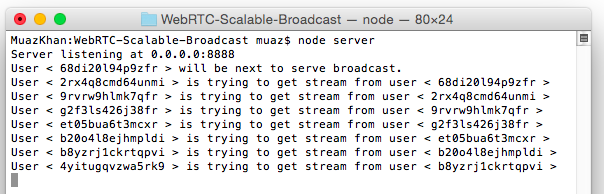
Above image showing terminal logs explains it better.
For more details, to understand how this broadcasting technique works:

Assuming peers 1-to-10:
First Peer:
Peer1 is the only peer that invokes getUserMedia. Rest of the peers will simply forward/relay remote stream.
peer1 captures user-media
peer1 starts the room
Second Peer:
peer2 joins the room
peer2 gets remote stream from peer1
peer2 opens a "parallel" broadcasting peer named as "peer2-broadcaster"
Third Peer:
peer3 joins the room
peer3 gets remote stream from peer2
peer3 opens a "parallel" broadcasting peer named as "peer3-broadcaster"
Fourth Peer:
peer4 joins the room
peer4 gets remote stream from peer3
peer4 opens a "parallel" broadcasting peer named as "peer4-broadcaster"
Fifth Peer:
peer5 joins the room
peer5 gets remote stream from peer4
peer5 opens a "parallel" broadcasting peer named as "peer5-broadcaster"
and 10th peer:
peer10 joins the room
peer10 gets remote stream from peer9
peer10 opens a "parallel" broadcasting peer named as "peer10-broadcaster"
Conclusion
- Peer9 gets remote stream from peer8
- Peer15 gets remote stream from peer14
- Peer50 gets remote stream from peer49
and so on.
License
Scalable WebRTC Broadcasting Demo is released under MIT licence . Copyright (c) Muaz Khan.
